Webflow SEO Complete Guide

Webflow SEO refers to the practice of optimizing websites that are built using the webflow platform for better visibility in search engine results. webflow is a popular website design and development platform that allows users to create responsive and visually appealing websites without the need for coding.

Optimizing a website for search engines (SEO) while using webflow involves a set of strategies and techniques to improve the website’s ranking in search engine results pages (SERPs). This optimization aims to make the website more discoverable by users when they search for relevant keywords or topics on search engines like Google, Bing, or Yahoo.

Key aspects of Webflow SEO may include:

  1. On-Page SEO: This involves optimizing individual web pages for specific keywords, optimizing meta titles and descriptions, using headers (H1, H2, H3) effectively, and ensuring that content is high-quality and relevant.
  2. Technical SEO: This includes optimizing the website’s technical aspects, such as improving site speed, ensuring mobile-friendliness, optimizing images, using proper URL structures, and fixing any crawl errors or technical issues.
  3. Keyword Research: Identifying relevant keywords and phrases that potential visitors might use to find your website’s content.
  4. Content Optimization: Creating high-quality, original, and engaging content that both users and search engines find valuable.
  5. Link Building: Acquiring high-quality backlinks from reputable websites to boost the website’s authority and trustworthiness in the eyes of search engines.
  6. User Experience (UX): Improving the website’s user experience, including navigation, page load speed, and mobile responsiveness.
  7. Analytics and Monitoring: Using tools like Google Analytics and Google Search Console to track the website’s performance, monitor keyword rankings, and make data-driven decisions for SEO improvements.
  8. Local SEO (if applicable): Optimizing the website for local searches, especially if the business or website serves a specific geographic area.

Webflow provides a user-friendly environment for website creation, and it also offers features and settings that can help with SEO, such as the ability to customize meta tags, set up 301 redirects, and create clean and responsive designs. However, successful Webflow SEO still requires knowledge and implementation of SEO best practices to ensure that the website ranks well in search engine results and attracts organic traffic.

Why Webflow SEO Matters

Before we dive into the nitty-gritty of Webflow SEO, let’s understand why it’s vital for the success of your website:

1. Visibility: Effective SEO ensures that your website ranks higher on search engine results pages (SERPs), making it more visible to potential visitors. If your website doesn’t appear on the first page of search results, you’re missing out on valuable traffic.

2. Traffic: Higher rankings lead to increased organic traffic, reducing your reliance on paid advertising. Organic traffic is not only cost-effective but also tends to be more engaged and likely to convert.

3. Credibility: Improved SEO helps establish your website as a trusted and authoritative source in your niche. When your website consistently appears at the top of search results, users are more likely to perceive it as credible and reliable.

4. User Experience: SEO best practices often align with better user experience. Websites optimized for SEO tend to load faster, provide intuitive navigation, and offer a seamless browsing experience.

In this blog post, we’ll talk about SEO (Search Engine Optimization) for your website built with Webflow. SEO helps your website get found by search engines like Google, so more people can visit and use your site.

We’ll keep things simple and give you easy-to-follow tips to improve your Webflow website’s SEO.

Choosing the Right Keywords: A Step-by-Step Guide

Keywords are the words or phrases that people type into search engines like Google when looking for information online. Coupling the power of Webflow’s intuitive design capabilities with effective webflow SEO practices can transform your website into a high-performing online asset, attracting organic traffic and elevating your digital presence.

Choosing the right keywords is crucial for improving your website’s visibility in search results. Here’s a step-by-step guide on how to select the right keywords for your content:

Keyword Research and Strategy

Keyword research is the cornerstone of any successful SEO strategy, and it’s no different when it comes to Webflow websites. The process involves identifying the specific words and phrases that your target audience is likely to use when searching for content related to your website.

How to Conduct Keyword Research for Webflow Websites

  1. Understand Your Audience: The first step in effective keyword research is to understand your audience’s needs, preferences, and pain points. What are they searching for, and what questions are they trying to answer?
  2. Brainstorm Seed Keywords: Start with a list of seed keywords or primary terms that describe your website’s main topics. These keywords serve as the foundation for further research.
  3. Keyword Research Tools: There are several keyword research tools available, such as Google Keyword Planner, Ubersuggest, Ahrefs, and SEMrush. These tools can help you expand your keyword list and provide valuable insights.
  4. Analyze Search Volume: Assess the search volume for each keyword. High search volume keywords are often competitive, while low-volume keywords may not drive enough traffic. Aim for a mix of moderate to high search volume keywords.
  5. Evaluate Keyword Competition: Consider the level of competition for each keyword. Highly competitive keywords may be challenging to rank for, especially if your website is relatively new. Look for a balance between competitive and less competitive keywords.
  6. Long-Tail Keywords: Don’t overlook long-tail keywords, which are longer, more specific phrases. While they may have lower search volume, they can be valuable for targeting niche audiences and answering specific queries.
  7. Keyword Relevance: Ensure that the keywords you choose are highly relevant to your website’s content and align with the search intent of your target audience.
  8. Explore Keyword Variations: Look for keyword variations and synonyms. This not only helps diversify your content but also captures a broader range of search queries.
  9. Location-Based Keywords (if applicable): If your Webflow website serves a specific geographic area, consider incorporating location-based keywords to attract local traffic.
  10. Focus on User Questions: Target keywords that reflect common questions or problems your audience has. Creating content that addresses these questions can establish your site as a valuable resource.
  11. Keyword Mapping: Organize your selected keywords into a keyword map. Assign specific keywords to relevant pages or sections of your Webflow site. This helps create a clear content structure and ensures that each page targets specific keywords.

Choosing the Right Keywords for Your Webflow Website

Selecting the right keywords is a strategic decision. Here are some tips to help you choose the most effective keywords for your Webflow website:

  • Prioritize keywords that strike a balance between search volume and competition.
  • Aim for a mix of short-tail and long-tail keywords to cover a broad range of user queries.
  • Ensure that selected keywords align with your website’s content and reflect user intent.
  • Consider the stage of the buyer’s journey your audience is in. Use informational keywords for top-of-funnel content and transactional keywords for product or service pages.

Keyword research is an ongoing process. As your website evolves and your audience’s needs change, revisit your keyword strategy and adapt accordingly. In the next section, we’ll delve into the critical aspect of on-page SEO for your Webflow site.

On-Page SEO in Webflow

On-page SEO involves optimizing individual pages of your Webflow website to ensure they are search engine-friendly. This includes optimizing elements on each page to improve their ranking potential. Let’s explore the key elements of on-page SEO tailored to Webflow:

Meta Titles and Descriptions:

Meta titles and meta descriptions are HTML elements that provide concise summaries of the content on a web page. They appear in search engine results and play a crucial role in attracting users to click on your page. Here’s how to optimize them:

  • Title Tags (Meta Titles): Craft compelling title tags for each page that include relevant keywords. Keep them concise, typically under 60 characters, to ensure they display fully in search results.
  • Meta Descriptions: Write informative and engaging meta descriptions that not only include keywords but also entice users to click. Aim for around 150-160 characters to maximize visibility in search results.

Header Tags (H1, H2, H3, etc.):

Header tags help organize your content and make it more readable. They also signal the hierarchy of information to search engines. Follow these guidelines:

  • H1: Use the H1 tag for the main title of your page. Make it descriptive and incorporate your primary keyword if relevant.
  • H2 and H3: Use H2 tags for subtopics and H3 tags for sub-subtopics. This hierarchical structure makes your content more scannable and user-friendly.

Keyword Placement and Content Optimization:

  • Incorporate your target keywords naturally within your content. Avoid keyword stuffing, which can harm your SEO.
  • Ensure that the content on each page is informative, relevant, and valuable to your audience. High-quality content is a ranking factor and keeps visitors engaged.

Mobile-Friendly Design:

Google prioritizes mobile-friendly websites in its search results. Ensure that your Webflow site looks good and functions well on mobile devices. Responsive design is a key aspect of this optimization.

Internal Linking:

Link to other relevant pages within your website’s content. Internal linking helps users navigate your site and spreads link equity throughout your site, which can improve SEO.

URL Structures:

Create clean and descriptive URL structures for your pages. Use hyphens to separate words, and keep URLs concise and easy to understand.

Avoid Duplicate Content:

Duplicate content can harm your SEO efforts. Ensure that each page on your website has unique and valuable content. Use canonical tags to indicate the preferred version of duplicate pages, if necessary.

Image Optimization:

Optimize images to improve page loading speed. Compress images to reduce file size, and use descriptive file names and alt text for images to improve accessibility and SEO.

Technical SEO for Webflow

Technical SEO focuses on the behind-the-scenes elements of your website that affect its search engine performance. In the context of Webflow, there are several technical aspects to consider for optimal SEO:

Site Speed Optimization:

  • Page loading speed is a crucial ranking factor. Optimize your Webflow site for faster loading by:
    • Compressing images and using efficient image formats (e.g., WebP).
    • Minimizing code and removing unnecessary scripts.
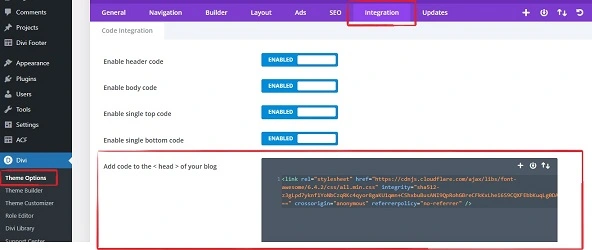
    • Using a Content Delivery Network (CDN) to distribute content globally.
    • Enabling browser caching.

XML Sitemaps:

  • Webflow generates XML sitemaps automatically. Ensure that your sitemap is up-to-date, as it helps search engines understand the structure of your site and index its pages efficiently.

Mobile-Friendly Design:

  • As mentioned earlier, a mobile-friendly design is essential for SEO. Ensure that your Webflow site looks and functions well on various mobile devices.

Clean URL Structures:

  • Use clean, descriptive URLs that reflect the content of your pages. Avoid using parameters or complex URL strings.

Structured Data and Schema Markup:

  • Implement structured data and schema markup to provide search engines with additional context about your content. This can result in rich search results, known as “rich snippets.”

HTTPS Security:

  • Secure your Webflow website with an SSL certificate to enable HTTPS. Google considers HTTPS as a ranking signal and provides a safer browsing experience for users.

404 Page Handling:

  • Customize your 404 error page to provide helpful information and guide users to other relevant parts of your website when they encounter broken links or missing pages.

Canonical Tags:

  • Use canonical tags when necessary to indicate the preferred version of a page, particularly for avoiding duplicate content issues.

Robots.txt and Robots Meta Tags:

  • Use a robots.txt file and robots meta tags to control how search engines crawl and index your Webflow site. Ensure that essential pages are not blocked from indexing.

Structured Data for Webflow CMS:

  • If your site uses Webflow CMS, consider implementing structured data to enhance the visibility of your CMS content in search results.

Monitoring for Technical Issues:

  • Regularly monitor your Webflow site for technical issues using tools like Google Search Console. Address issues such as crawl errors, mobile usability problems, and index coverage.

Technical SEO is an ongoing effort that requires continuous monitoring and adjustments. Ensuring that your Webflow site is technically optimized can significantly improve its search engine performance and user experience.

Link Building Strategies for Webflow

Link building is a fundamental aspect of SEO, and for Webflow websites, it’s essential for building authority and improving search engine rankings. Here are some effective link-building strategies tailored to Webflow:

1. Content Creation and Promotion:

  • Create high-quality, informative, and shareable content on your Webflow website. Well-researched blog posts, guides, infographics, and videos can naturally attract links from other websites.
  • Promote your content through social media, email outreach, and influencer partnerships to increase its visibility and encourage others to link to it.

2. Guest Blogging:

  • Write guest posts for reputable websites in your niche. Include a link back to your Webflow site in your author bio or within the content if it adds value.
  • Ensure that the websites you contribute to are relevant and have a good domain authority (DA).

3. Broken Link Building:

  • Identify websites in your niche that have broken links (links that point to non-existent pages).
  • Reach out to the website owners and offer to provide a replacement link to your relevant content. This not only helps them but also earns you a valuable backlink.

4. Brand Mentions:

  • Monitor the web for mentions of your brand, products, or services. If a mention doesn’t include a link, politely reach out to the author or website and request that they link to your site.

5. Resource Pages:

  • Find resource pages or link directories related to your industry or niche. Contact the page owners and request that they include your website if it provides valuable resources.

6. Competitor Backlinks:

  • Analyze the backlink profiles of your competitors using tools like Ahrefs or Moz. Identify opportunities where you can replicate or surpass their backlinks.

7. Webflow Showcase:

  • If your Webflow site is exceptional and showcases outstanding design or functionality, submit it to the Webflow Showcase. This can generate exposure and potential backlinks.

8. Testimonials and Reviews:

  • Provide testimonials or reviews for products, services, or tools you use in your industry. These testimonials often include a link back to your website.

9. Collaborate with Partners:

  • If you have business partners or collaborators, explore opportunities to feature each other on your websites, which can include backlinks.

10. Local Citations (if applicable):

  • For local businesses, ensure that your business information is consistent across online directories and review sites like Google My Business, Yelp, and Yellow Pages. These citations can improve local SEO and visibility.

Remember that link building should focus on quality over quantity. High-quality, relevant backlinks from authoritative websites have a more significant impact on your SEO than numerous low-quality links. Additionally, always prioritize white-hat SEO practices to maintain your website’s credibility and avoid penalties from search engines.

User Experience (UX) and SEO for Webflow

A seamless and user-friendly experience on your Webflow website not only enhances visitor satisfaction but also plays a crucial role in SEO. Google and other search engines prioritize websites that provide excellent user experiences. Here’s how you can optimize UX to improve your website’s SEO:

1. Responsive and Mobile-Friendly Design:

Ensure that your Webflow site is responsive and functions smoothly on various devices and screen sizes. Google gives preference to mobile-friendly websites in its search results, making mobile optimization essential.

2. Page Load Speed:

Fast-loading pages are crucial for both user experience and SEO. Slow-loading pages can lead to higher bounce rates and lower search engine rankings. Optimize your website’s performance by compressing images, minimizing code, and using content delivery networks (CDNs).

3. Intuitive Navigation:

Design your website’s navigation menus and structure to be clear and user-friendly. Visitors should easily find the information they’re looking for without confusion. Use descriptive menu labels and organize content logically.

4. Readability and Content Layout:

Ensure that your content is well-organized and easy to read. Use proper header tags (H1, H2, H3) to structure content hierarchically. Break up large blocks of text with visuals, bullet points, and short paragraphs for better readability.

5. Accessibility Considerations:

Make your Webflow website accessible to all users, including those with disabilities. Provide alternative text (alt text) for images, ensure proper contrast between text and background, and follow web accessibility guidelines (WCAG) to enhance the user experience.

6. Clear Call-to-Action (CTA):

Guide visitors to take desired actions on your site through clear and strategically placed CTAs. Whether it’s signing up for a newsletter, making a purchase, or contacting you, CTAs should be prominently displayed.

7. Reduce Pop-ups and Intrusive Ads:

While pop-ups and ads can serve a purpose, overly intrusive ones can disrupt the user experience. Balance the use of these elements to maintain a positive user experience.

8. Secure Website (HTTPS):

Ensure that your Webflow site is secure by using HTTPS. Users are more likely to trust and engage with secure websites, which can indirectly benefit your SEO.

9. Engaging Multimedia Content:

Incorporate engaging multimedia content, such as videos, images, and interactive elements, to enhance user engagement and time spent on your site. High engagement metrics can positively impact your SEO.

10. User Feedback and Testing:

Collect feedback from users and conduct usability testing to identify areas for improvement in your website’s UX. Addressing user concerns and preferences can lead to higher user satisfaction and better SEO results.

Monitoring and Analytics for Webflow SEO

Effective SEO is an ongoing process, and monitoring your website’s performance is crucial to ensuring that your efforts yield positive results. Here’s how you can use monitoring and analytics tools to track and improve your Webflow SEO:

1. Google Analytics:

  • Set up Google Analytics for your Webflow website to track various metrics, including traffic sources, user behavior, and conversion rates. Monitor key performance indicators (KPIs) such as:
    • Total organic traffic.
    • Bounce rate (the percentage of visitors who leave without interacting with your site).
    • Average session duration.
    • Conversion goals (e.g., form submissions, purchases).

2. Google Search Console:

  • Connect your Webflow site to Google Search Console to monitor your site’s presence in Google search results. This tool provides valuable insights, including:
    • Indexing status (how many pages are indexed).
    • Click-through rates (CTR) for specific keywords.
    • Mobile usability issues.
    • Index coverage and crawl errors.

3. Keyword Ranking Tools:

  • Use keyword ranking tools like Ahrefs, SEMrush, or Moz to track the rankings of your target keywords. Monitor keyword positions over time to gauge the effectiveness of your SEO efforts.

4. Traffic Sources and User Behavior:

  • Analyze the sources of your website’s traffic (e.g., organic, direct, referral, social) to understand where visitors are coming from.
  • Examine user behavior data to identify which pages are most engaging and which may require improvements.

5. Conversion Tracking:

  • Implement conversion tracking to measure the effectiveness of your SEO in achieving specific goals, such as newsletter sign-ups, lead generation, or e-commerce sales.

6. Landing Page Performance:

  • Assess the performance of individual landing pages. Identify which pages are driving the most organic traffic and conversions.

7. Content Performance:

  • Analyze the performance of your content by tracking metrics like page views, time on page, and social shares. Use this data to refine your content strategy.

8. User Demographics and Behavior:

  • Understand your audience’s demographics, interests, and geographic location through analytics tools. Tailor your content and SEO strategies accordingly.

9. A/B Testing:

  • Conduct A/B tests to experiment with changes to your website’s elements (e.g., headlines, CTAs, layouts) and determine which variations lead to better SEO outcomes.

10. Regular Audits:

  • Perform regular SEO audits of your Webflow site to identify technical issues, broken links, and opportunities for improvement. Address any issues promptly.

11. Competitor Analysis:

  • Keep an eye on your competitors and analyze their SEO strategies. Identify keywords they are ranking for and opportunities where you can outperform them.

12. Analytics Insights into User Intent:

  • Use analytics data to gain insights into user intent. Understand the questions and problems your audience has, and create content that aligns with their needs.

By regularly monitoring your Webflow website’s performance using these tools and strategies, you can make data-driven decisions to refine your SEO strategy, improve user experience, and drive continuous improvement in your search engine rankings.

Local SEO for Webflow (if applicable)

If your Webflow website caters to a specific geographic area or serves a local audience, optimizing for local SEO is essential. Local SEO helps businesses appear in local search results, making it crucial for attracting nearby customers. Here’s how to enhance your Webflow site’s local SEO:

1. Google My Business (GMB) Optimization:

  • Claim and verify your Google My Business listing. Ensure that your business name, address, phone number (NAP), and website URL are accurate and consistent across all online directories.
  • Add high-quality images of your business, products, or services to your GMB profile.

2. NAP Citations:

  • Ensure that your business information (NAP) is consistent across online directories, review sites, and social media platforms. Inconsistent NAP can confuse search engines and customers.

3. Local Keyword Optimization:

  • Include location-specific keywords naturally within your website’s content, meta tags, and headings. For example, if you run a bakery in Chicago, use phrases like “Chicago bakery” or “best bakery in Chicago.”

4. Local Schema Markup:

  • Implement local schema markup to provide search engines with structured data about your business, including its name, address, phone number, hours of operation, and customer reviews.

5. Online Reviews:

  • Encourage customers to leave reviews on platforms like Google, Yelp, and TripAdvisor. Positive reviews can boost your local SEO and credibility.

6. Local Link Building:

  • Build local backlinks by partnering with local organizations, sponsoring local events, or participating in community activities. Local links can enhance your website’s authority.

7. Local Content:

  • Create content relevant to your local audience. Write blog posts, articles, or guides about local events, news, or topics of interest to your community.

8. Mobile Optimization:

  • Optimize your Webflow site for mobile devices, as local searches often occur on smartphones and tablets.

9. Location Pages:

  • If your business has multiple locations, create dedicated location pages on your website. Each page should include specific NAP information, directions, and unique content for each location.

10. Geotargeting:

  • Use geotargeting in Google Ads to reach local customers with specific promotions or offers.

Local SEO is a powerful strategy for brick-and-mortar businesses and service providers looking to attract customers in their immediate vicinity. By implementing these local SEO tactics within your Webflow website, you can increase your visibility in local search results and connect with local customers more effectively.

E-commerce SEO for Webflow (if applicable)

If your Webflow website includes an online store or e-commerce section, optimizing for e-commerce SEO is essential for driving traffic and sales. Here are strategies to enhance the SEO of your Webflow e-commerce site:

1. Keyword Research for Products:

  • Conduct keyword research to identify relevant keywords for your product listings. Focus on long-tail keywords that align with user intent, such as “buy [product name]” or “best [product category] in [location].”

2. Product Page Optimization:

  • Optimize individual product pages with clear, descriptive titles, meta descriptions, and high-quality images. Include essential product information, specifications, and pricing.

3. User Reviews:

  • Encourage customers to leave reviews for your products. Reviews not only build trust but also add valuable, user-generated content to your product pages.

4. Structured Data (Schema Markup):

  • Implement structured data markup for e-commerce products. This helps search engines understand your product information and may lead to rich snippets in search results.

5. Product Categories and Navigation:

  • Organize your products into well-defined categories and use clear navigation menus. This enhances user experience and makes it easier for both visitors and search engines to find products.

6. Product URLs:

  • Create clean and descriptive URLs for each product page. Include relevant keywords but keep URLs concise and user-friendly.

7. High-Quality Content:

  • Write unique and informative product descriptions that highlight the benefits, features, and use cases of each product. Avoid using manufacturer-provided content that may be duplicated on other websites.

8. Mobile Optimization:

  • Ensure that your e-commerce site is mobile-friendly. Many users shop on mobile devices, and Google considers mobile-friendliness as a ranking factor.

9. Secure Checkout:

  • Implement secure and user-friendly checkout processes to reduce cart abandonment rates and improve the overall shopping experience.

10. Product Images and Alt Text:

  • Optimize product images for both quality and load speed. Use descriptive alt text for images to improve accessibility and SEO.

11. Canonical Tags:

  • Use canonical tags to indicate the preferred version of product pages if you have similar or duplicate content, such as different product variations.

12. Site Speed and Performance:

  • Optimize your e-commerce site for speed, as slow-loading pages can result in lost sales. Compress images, minimize code, and use a content delivery network (CDN) for improved performance.

13. Inventory Management:

  • Keep product availability and stock information up-to-date on your website. Clearly communicate when products are out of stock or discontinued.

14. Shipping and Returns Information:

  • Provide clear shipping, returns, and customer service information to build trust with potential buyers. Transparency about shipping costs and delivery times is crucial.

15. Product Recommendations:

  • Implement product recommendation features that suggest related or complementary products to enhance cross-selling and upselling opportunities.

16. Online Security (HTTPS):

  • Secure your e-commerce site with HTTPS to protect customer data and improve trust. Google considers HTTPS as a ranking signal.

E-commerce SEO requires ongoing attention and optimization, especially as your product catalog evolves. Regularly review your product listings, keywords, and performance data to refine your strategy and drive more organic traffic to your Webflow e-commerce site.

Multilingual and International SEO (if applicable)

If your Webflow website targets a global audience or serves multiple language markets, optimizing for multilingual and international SEO is essential to reach a diverse range of users. Here’s how to expand your website’s reach effectively:

1. Multilingual Content:

  • Create content in multiple languages to cater to your international audience. Ensure that each language version provides high-quality and culturally relevant content.

2. hreflang Tags:

  • Implement hreflang tags in the HTML of your pages to indicate the language and regional targeting of each page. This helps search engines display the correct version to users in different regions.

3. Language Subdirectories or Subdomains:

  • Structure your multilingual content using language subdirectories (e.g., example.com/en/ for English, example.com/es/ for Spanish) or subdomains (e.g., en.example.com, es.example.com).

4. Geotargeting:

  • Use Google Search Console to set geotargeting preferences for specific subdirectories or subdomains if your website serves different countries. This tells Google which content is intended for which region.

5. International Keyword Research:

  • Conduct keyword research specific to each target language and region. Consider regional variations of keywords and search terms.

6. Content Localization:

  • Localize content for each target market by adapting language, currency, measurements, and cultural nuances. Avoid using automated translation tools for critical content.

7. International SEO Tags:

  • Optimize meta titles, meta descriptions, and header tags for each language and region. Use relevant keywords and ensure that they align with user intent.

8. Country Code Top-Level Domains (ccTLDs):

  • Consider using country code top-level domains (e.g., .uk for the United Kingdom, .de for Germany) for better geo-targeting and localization.

9. Local Backlinks:

  • Build local backlinks from authoritative websites in each target region. Local backlinks can improve your website’s visibility in specific regions.

10. Mobile Optimization:

  • Ensure that your multilingual and international websites are mobile-friendly. Mobile optimization is crucial for global audiences.

11. International SEO Tools:

  • Use international SEO tools like SEMrush or Ahrefs to track rankings, analyze international competitors, and identify opportunities for improvement.

12. Localized Customer Support:

  • Provide customer support in the languages of your target markets. This builds trust and helps resolve issues effectively.

13. Currency and Pricing:

  • Display prices in the local currency and include shipping and tax information relevant to each region.

14. Legal Compliance:

  • Ensure that your website complies with the legal and regulatory requirements of each target country. This includes privacy policies, terms of service, and GDPR compliance in Europe.

15. International Hosting and Content Delivery:

  • Use hosting and content delivery networks (CDNs) that can serve your content from servers located in or near your target regions. This improves page load times.

16. Monitor International SERPs:

  • Regularly monitor search engine results pages (SERPs) in each target region to assess your website’s visibility and performance.

Optimizing for multilingual and international SEO requires meticulous planning and execution. Consider the unique cultural and linguistic nuances of each market, and adapt your SEO strategy accordingly to maximize your reach and engagement with international audiences.

Final Tips

Congratulations! You’ve learned about various aspects of Webflow SEO, from keyword research to technical optimization, local SEO, e-commerce SEO, and international considerations. Before we conclude, here are some final tips and a recap of key points:

Final Tips:

  1. Content Quality: Always prioritize high-quality, informative, and user-friendly content. Content is at the heart of SEO success.
  2. Consistency: Consistency in branding, NAP information, and content style across your website and online profiles helps build trust with users and search engines.
  3. User Experience: Prioritize user experience (UX) by optimizing for mobile, improving page load speed, and making navigation intuitive.
  4. Regular Audits: Conduct regular SEO audits to identify and address technical issues, broken links, and other optimization opportunities.
  5. Monitoring: Continuously monitor your website’s performance using tools like Google Analytics and Google Search Console. Use data to make informed decisions.
  6. Patience: SEO is a long-term strategy. Results may not be immediate, so be patient and consistent in your efforts.

Recap of Key Points:

  1. Keyword Research: Conduct keyword research to identify relevant keywords and phrases.
  2. On-Page SEO: Optimize meta titles, descriptions, headers, and content for search engines.
  3. Technical SEO: Focus on site speed, XML sitemaps, mobile optimization, and clean URL structures.
  4. Link Building: Build high-quality backlinks through content creation, guest blogging, and partnerships.
  5. User Experience (UX): Ensure a responsive design, fast load times, and intuitive navigation.
  6. Monitoring and Analytics: Use tools like Google Analytics and Search Console to track performance.
  7. Local SEO: Optimize for local searches with GMB, NAP citations, and local content.
  8. E-commerce SEO: Optimize product pages, reviews, and mobile experience for e-commerce websites.
  9. Multilingual and International SEO: Expand your reach with multilingual content, hreflang tags, and geotargeting.
  10. Final Tips: Prioritize content quality, consistency, and user experience. Be patient and monitor your progress.

Remember that SEO is an ongoing process, and it requires adaptability and continuous improvement. By implementing these strategies and staying committed to your SEO efforts, your Webflow website can achieve higher visibility and attract more visitors from search engines.

conclusion

In conclusion, Webflow SEO is a journey that requires planning, consistent execution, and a commitment to user experience. We’ve covered essential strategies, including keyword research, on-page optimization, technical improvements, link building, local SEO, e-commerce optimization, and multilingual considerations. Patience is key, as SEO takes time. Regular monitoring and adaptation are crucial for long-term success. Armed with this knowledge, you’re ready to improve your Webflow site’s visibility and rankings. Good luck on your SEO journey!

What is Webflow SEO, and why is it important?

Webflow SEO refers to the practice of optimizing websites built on the Webflow platform for better visibility in search engine results. It’s essential because it helps your website rank higher in search engines, making it more discoverable to users searching for relevant content.

What are the key elements of on-page SEO for Webflow sites?

On-page SEO for Webflow sites includes optimizing meta titles and descriptions, using headers (H1, H2, H3) effectively, choosing relevant keywords, creating high-quality content, and ensuring a mobile-friendly design.
How to add the Google Analytics integration to your Webflow site?

Adding Webflow to Google Analytics integration is essential for tracking and analyzing user behavior and website performance effectively. Here’s why it’s important:

  • Data-Driven Decisions: Google Analytics informs content, design, and marketing.
  • Measure Success: Gauge website and marketing performance for improvement.
  • Identify Issues: Detect bounce rates, and improve user experience.
  • Optimize User Experience: Track behavior, and tailor content to the audience.

To quickly add Google Analytics to your Webflow site, follow these simplified steps:

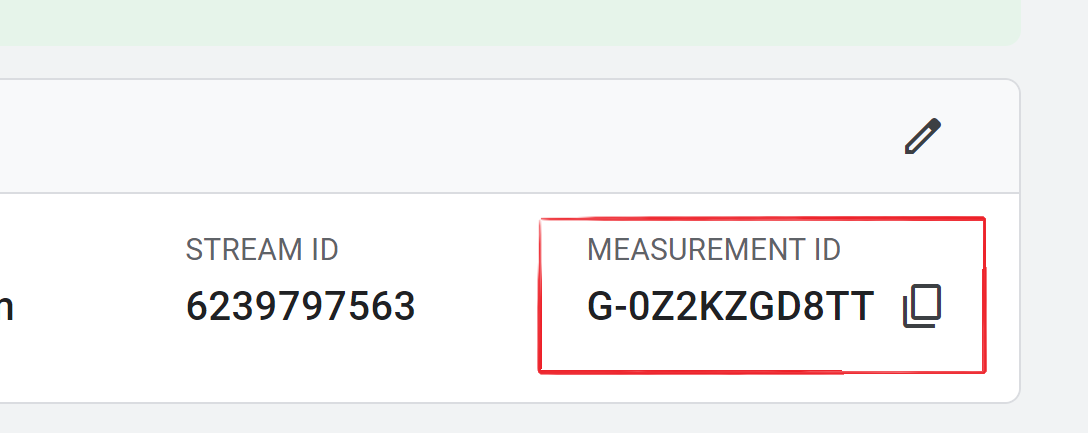
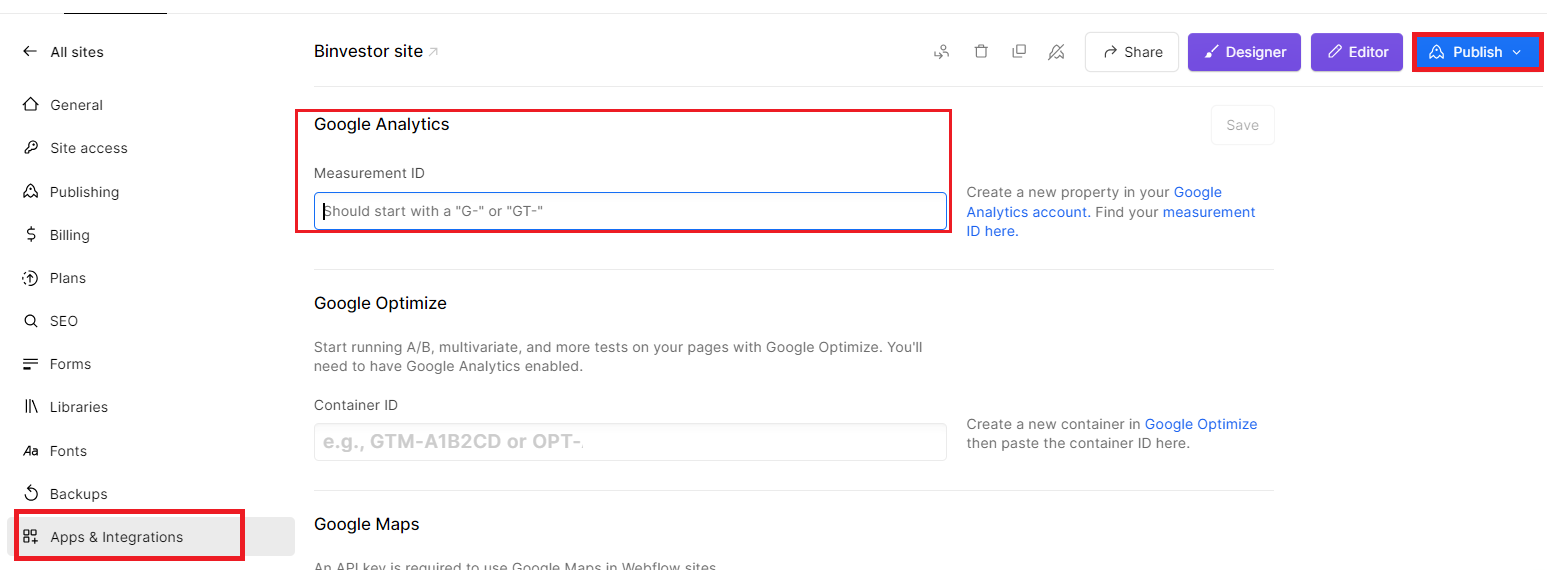
Copy your Google Analytics ID> paste it in webflow> publish for a quick integration.

In this blog post, we’ll guide you through the process of adding Google Analytics integration to your site, step by step, without overwhelming you with technical jargon. With Google Analytics, you’ll be equipped with powerful metrics that reveal user behavior, helping you make informed decisions, optimize your site, and make your online presence more effective than ever. Let’s dive in!

Why Choose Webflow for Your Website?

If you’re new to website development or considering a platform switch, you might wonder why webflow is a popular choice. Here are a few key reasons:

Here are the key points from the section on why to choose webflow for your Website.

  • Code-Free Design: Build without coding, ideal for all levels.
  • Full Design Control: Customize your site extensively.
  • Mobile-Friendly: Ensure performance on all devices.
  • Easy Hosting: Streamlined hosting and domains.
  • SEO Tools: Boost search engine visibility.
  • E-commerce Ready: Create online stores effortlessly.
  • Supportive Community: Access resources and community help.

add the Google Analytics integration to your Webflow site

Google Analytics is a powerful tool for tracking visitor behavior on your website. Here’s a straightforward guide to integrating Google Analytics with your Webflow site, using Google Analytics 4 measurement IDs.

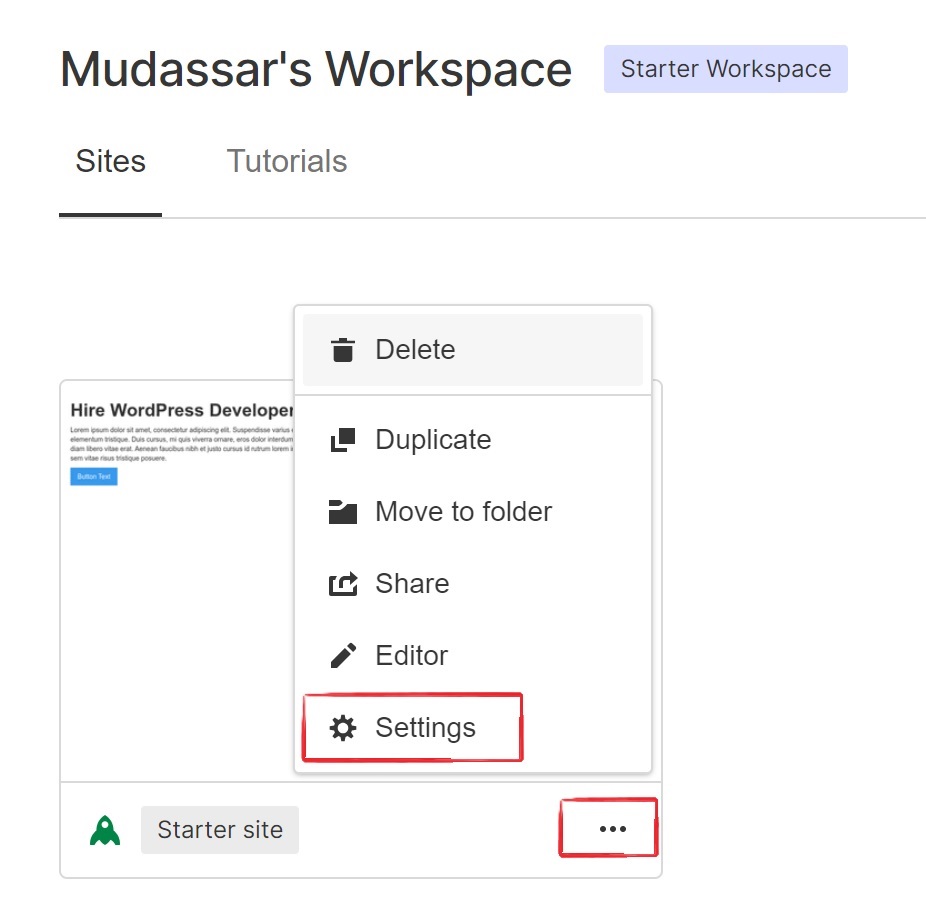
Step 1: Open Webflow Dashboard and click 3 dots. Now Click on Settings.

Webflow Setting

Step 2: Go to the Integrations tab and you see Google Analytics. Paste the Tracking ID you copied from Google Analytics into the Google Analytics Tracking IDfield.

Google analytics measurement ID
Google Analytics integration

Step 3: Click Save changes.Finally, publish your site.

Google Analytics will now start tracking your website’s data. You’ve successfully added Google Analytics to your webflow site. Now, you can monitor your website’s performance and gain insights into your audience without the need for difficult technical terms or complex sentences.

Security and Privacy Considerations

When integrating Google Analytics with your webflow site, it’s crucial to consider security and privacy. Ensure that you comply with data protection regulations like GDPR and have a clear privacy policy in place. Additionally, configure Google Analytics to anonymize IP addresses if needed to safeguard user privacy.

By addressing these security and privacy aspects, you not only protect your users’ data but also maintain trust and credibility in an era where data protection is paramount.

Webflow E-commerce Integration:

Webflow offers user-friendly e-commerce tools with customizable templates, secure payment options, and responsive design. Manage products, track inventory, and access data analytics for a seamless online shopping experience.

  • User-Friendly E-commerce: webflow simplifies the setup and management of online stores, catering to users of all technical levels.
  • Customizable Design: Users can personalize their e-commerce sites with customizable templates and design options to align with their brand.
  • Essential Features: webflow’s e-commerce integration offers secure payments, inventory tracking, and data analytics, streamlining online store operations and facilitating growth.

Webflow Best Practices for SEO Optimization

For webflow users aiming to maximize their website’s online visibility, understanding SEO (Search Engine Optimization) best practices is essential. Here are some key strategies:

  • Keyword Optimization: Use relevant keywords for better visibility.
  • Mobile-Friendly Design: Ensure mobile responsiveness for wider reach.
  • Quality Content: Engage users with valuable, updated content.

conclusion

Incorporating Google Analytics integration into your Webflow site empowers you with data-driven insights for informed decision-making and website optimization. With its user-friendly integration, Webflow ensures that tracking user behavior and improving your online presence is accessible to all, regardless of your technical background. Harness the power of Google Analytics to enhance user experiences and watch your online presence flourish.

What is Webflow, and why should I integrate it with Google Analytics integration?

Webflow is a web design and development platform that allows you to create custom websites. Integrating it with Google Analytics helps you track user behavior, gain insights, and make data-driven decisions to improve your website’s performance.

How do I find my Google Analytics Measurement ID?

Log in to your Google Analytics account, select the property (website) you want to track, go to “Admin,” choose “Data Streams,” click “Web,” and copy your Measurement ID (starts with “G-“).

Can I integrate Google Analytics into any Webflow plan?

Yes, Google Analytics integration is available for all Webflow plans, including free and paid ones.

StackPath CDN Pricing, Features, Reviews and Alternatives

The digital world is constantly evolving, and with it, the need for efficient content delivery networks (CDNs) has never been greater. Enter StackPath, a contender promising top-notch performance, security, and scalability. But with a plethora of CDN choices out there, understanding how Stackpath fits in can be a challenge. That’s why we’ve crafted this comprehensive guide.

In this article, we’ll break down Stackpath CDN in a way that’s easy to grasp, covering pricing, highlighting standout features, sharing real-world user reviews, and even offering alternative options. Whether you’re a tech pro or just curious about CDNs, join us as we demystify Stackpath and show you what makes it a notable player in this competitive field.

Understanding StackPath CDN

StackPath is a global CDN and cloud service provider designed to enhance the speed, security, and reliability of websites and applications. It achieves this by distributing your website’s content across a network of strategically located servers worldwide. This global presence ensures that users can access your website quickly, regardless of their geographical location.

Understanding StackPath: What Is It?

At its core, Stackpath is a CDN, but it’s much more than that. It’s a global platform designed to make your website faster, more secure, and highly available. Stackpath achieves this by strategically distributing your website’s content across a network of servers located in various regions around the world.

Key Features of StackPath

Before we hear from users, let’s recap some key features that make Stackpath CDN stand out:

  • Global Content Delivery: Stackpath’s vast network of servers across the globe ensures swift content delivery to users, reducing latency.
  • Lightning-Fast Performance: Advanced caching techniques and optimized content delivery contribute to rapid loading times.
  • Enhanced Security: Stackpath offers DDoS protection, Web Application Firewall (WAF), and SSL certificates to safeguard websites.
  • Real-Time Analytics: Monitoring tools provide valuable insights into traffic patterns and content delivery.
  • Easy Integration: Stackpath offers seamless integration with various web platforms through plugins, libraries, and APIs.
  • High Availability: Redundant infrastructure and multiple edge locations contribute to high uptime.

How StackPath Benefits Your Website

  • Faster Load Times: Speed matters on the web. Slow-loading websites can frustrate visitors and harm your search engine rankings. Stackpath caching and content distribution reduce load times, ensuring a better user experience.
  • Improved Security: Online threats are ever-present, and website security is non-negotiable. Stackpath security features act as a shield, protecting your site from malicious attacks and ensuring its availability.
  • Global Accessibility: In an interconnected world, your website’s accessibility to a global audience is crucial. The Stackpath server network ensures that your content is delivered swiftly to visitors, regardless of their location.
  • Enhanced User Experience: A fast, secure website leads to happier visitors who are more likely to engage with your content and convert into customers or loyal readers.
  • Scalability: As your website grows, Stackpath can scale with you. Whether you experience a surge in traffic or expand your content offerings, StackPath’s infrastructure can handle the load.

Getting Started with StackPath

  • Sign Up: Start by creating an account on the Stackpath website.
  • Configuration: Follow the setup process and configure your CDN settings to align with your website’s requirements.
  • Integration: Stackpath offers plugins and integration guides for various web platforms (e.g., WordPress, Drupal) to help you seamlessly connect your website to the service.
  • Monitoring and Optimization: Once set up, regularly monitor your website’s performance through Stackpath-provided tools and make necessary adjustments to further optimize your site.

StackPath CDN Features

One solution that stands out in addressing these critical aspects is StackPath CDN (Content Delivery Network). Stackpath offers a suite of powerful features designed to enhance your website’s speed, reliability, and protection against online threats.

FeaturesDescriptions
Serverless ScriptingRun scripts closer to users, reducing latency and enhancing functionality.
Global Content DeliveryA vast network of servers strategically located worldwide to reduce latency.
Lightning-Fast PerformanceAdvanced caching techniques for rapid content delivery and minimized server load.
Enhanced SecurityDDoS protection, Web Application Firewall (WAF), and SSL certificates for robust security.
Real-Time AnalyticsMonitoring tools providing insights into traffic and content delivery.
Easy IntegrationPlugins, libraries, and APIs for seamless integration with various web platforms.
Instant PurgeAbility to clear cached content instantly for updates or removal.

Global Content Delivery

StackPath CDN boasts a robust network of strategically located servers worldwide. This global presence ensures that your website’s content is delivered from the nearest server to each user, drastically reducing loading times and providing a smoother browsing experience. Whether your audience is in New York or New Delhi, your content reaches them with minimal latency.

Lightning-Fast Performance

Website speed is a critical factor that impacts user engagement and search engine rankings. Stackpath CDN employs advanced caching techniques, effectively reducing server load and accelerating content delivery. By caching static and dynamic content, Stackpath ensures that your web pages load swiftly, even during traffic spikes.

Enhanced Security Features

Online security threats are on the rise, making robust website protection a top priority. Stackpath CDN offers an array of security features, including:

  • DDoS Protection: Distributed Denial of Service (DDoS) attacks can disrupt your website’s availability. StackPpath’s DDoS protection mitigates these attacks, ensuring uninterrupted service.
  • Web Application Firewall (WAF): WAF safeguards your site from web application attacks, such as SQL injection and cross-site scripting (XSS). It filters malicious traffic and keeps your website secure.
  • SSL Certificates: Secure Sockets Layer (SSL) certificates encrypt data exchanged between your site and users, enhancing data security and user trust.

Real-Time Analytics

To optimize your website’s performance, you need insights into user behavior and traffic patterns. StackPath CDN provides real-time analytics, allowing you to monitor traffic, track content delivery, and make data-driven decisions to improve your website’s performance.

Easy Integration

Integrating StackPath CDN into your website is a straightforward process. Whether you’re using a popular content management system like WordPress or a custom-built site, Stackpath offers plugins, libraries, and APIs to facilitate seamless integration.

High Availability and Redundancy

StackPath CDN is designed for reliability. With a redundant network infrastructure and multiple edge locations, it ensures that your website remains available even in the face of server failures or network issues.

Customization and Control

StackPath CDN provides granular control over cache settings and content delivery. You can customize cache rules to suit your website’s specific needs, ensuring that critical content remains fresh while optimizing bandwidth usage.

Content Compression

Stackpath automatically compresses content before delivering it to users, reducing file sizes and further enhancing website speed.

Instant Purge

If you need to remove or update content on your website, Stackpath’s instant purge feature allows you to clear cached content instantly, ensuring that users receive the most up-to-date information.

Serverless Scripting

Stackpath’s serverless computing enables you to run scripts closer to your users, reducing latency and enhancing the functionality of your website or application.

StackPath CDN Pricing

When it comes to ensuring your website’s optimal performance, a Content Delivery Network (CDN) can be a game-changer. CDNs like StackPath play a crucial role in delivering your web content faster and more securely to users around the world. However, one question that often arises when considering a CDN service is, “How much does it cost?”

StackPath CDN Pricing PlansDescription
Pay-as-You-GoFlexible pricing based on actual resource usage.
Monthly Billing CycleStandard monthly billing for consistent usage.
Yearly Billing CycleAnnual billing for potential cost savings.
Custom PricingTailored plans for high-traffic or specific needs.

We will delve into Stackpath CDN pricing to help you understand the costs, plans, and factors that influence your investment in this powerful content delivery network.

StackPath CDN Pricing Plans

StackPath offers a range of pricing plans to accommodate various business needs, from small websites to large enterprises. Understanding these plans is essential to make an informed decision for your web infrastructure. Here are the key Stackpath CDN pricing plans:

  1. Pay-as-You-Go: This plan is suitable for websites with fluctuating traffic or those looking for a flexible, on-demand CDN solution. With pay-as-you-go pricing, you pay only for the resources you use, making it a cost-effective choice for startups and small businesses.
  2. Billing Cycles: Stackpath offers monthly and yearly billing cycles, allowing you to choose the payment schedule that aligns with your budget and long-term plans.
  3. Custom Pricing: For high-traffic websites or enterprises with specific needs, Stackpath provides custom pricing options. This tailored approach ensures that you get the exact CDN services required to support your web infrastructure.

Factors Affecting StackPath CDN Pricing

Several factors can influence the cost of your StackPath CDN plan. It’s essential to consider these variables when assessing which plan best suits your needs:

  1. Bandwidth Usage: The amount of data transferred from your origin server to end users (bandwidth) plays a significant role in pricing. Higher bandwidth usage will result in increased costs.
  2. Storage: If you require additional storage space for caching content or hosting files, this will impact your pricing. Stackpath charges based on the amount of storage you use.
  3. SSL Certificates: Secure Sockets Layer (SSL) certificates are essential for website security. Stackpath offers SSL services, and the type and number of certificates you need may affect your pricing.
  4. Edge Locations: Stackpath operates a global network with various edge locations. The number of edge locations you utilize can influence your pricing, as it affects the reach and speed of content delivery.
  5. Additional Services: Stackpath offers a range of additional services, such as DDoS protection, Web Application Firewall (WAF), and serverless computing. Opting for these services may have associated costs.

Calculating Your StackPath CDN Costs

To estimate your StackPath CDN costs, follow these steps:

  1. Determine Your Needs: Assess your website’s requirements in terms of bandwidth, storage, SSL certificates, and additional services.
  2. Select the Right Plan: Choose the Stackpath CDN plan that aligns with your needs and budget. Pay attention to billing cycles and custom pricing options.
  3. Monitor Usage: Keep an eye on your CDN usage through StackPath’s reporting and monitoring tools. This helps you stay within your budget and adjust your plan if necessary.
  4. Consider Long-Term Commitments: If you anticipate stable or growing traffic, consider annual billing cycles for potential cost savings.

StackPath CDN Alternatives

While StackPath CDN offers an array of features and benefits, it’s essential to consider various options to find the one that best suits your unique requirements. Every website is different, and what works for one may not be the best fit for another. By exploring alternatives, you can make a more informed decision about the CDN that will best empower your website.

Some of StackPath CDN Alternatives

Now, let’s explore some notable StackPath CDN alternatives:

  • Cloudflare: Cloudflare is renowned for its security features and global network. It offers CDN services alongside DDoS protection and web security.
  • Akamai: Akamai, a veteran in the CDN industry, specializes in reliability and performance, serving enterprises and large-scale websites.
  • Amazon CloudFront: Part of Amazon Web Services (AWS), CloudFront is a scalable CDN option with robust global reach.
  • Fastly: Targeted at developers, Fastly provides real-time caching and instant purging, ideal for dynamic content delivery.
  • KeyCDN: KeyCDN is a budget-friendly option with a global presence, focusing on fast and efficient content delivery.

Evaluating Your Options

When considering StackPath CDN alternatives, it’s essential to evaluate each option based on your specific needs. Factors like your website’s size, audience, content type, and budget will influence your decision.

  • Performance: Compare the speed and performance of each CDN by testing them with your website’s content. Look for improvements in loading times and user experience.
  • Security: Assess the security features provided by each CDN, including DDoS protection, WAF, and SSL support. Consider which option aligns best with your website’s security requirements.
  • Global Reach: Evaluate the CDN’s server network to ensure it covers the geographic regions relevant to your audience. Faster content delivery worldwide is essential for a seamless user experience.
  • Ease of Integration: Explore the integration options for your specific web platform (e.g., WordPress, Drupal). A smooth setup process can save time and effort.
  • Scalability: Consider your website’s potential for growth and choose a CDN that can scale to accommodate increasing traffic.

While StackPath CDN offers impressive features, exploring alternatives allows you to find the perfect CDN solution tailored to your website’s unique needs. Whether you prioritize speed, security, scalability, or ease of integration, the right CDN can significantly enhance your website’s capabilities and provide a better experience for your users.

StackPath CDN Reviews

StackPath CDN reviews from real users paint a picture of a service that delivers on its promises. From faster loading times and enhanced security to seamless integration and valuable analytics, Stackpath CDN appears to be a powerful tool for website owners and developers looking to enhance their online presence.

Users across different online domains have shared their valuable experiences with Stackpath CDN, highlighting its impact on their websites. One user described how Stackpath CDN significantly accelerated their website’s loading times, resulting in reduced bounce rates and higher user engagement. They particularly appreciated Stackpath’s global content delivery network, which ensured that visitors from various regions experienced a smooth browsing experience.

  • Lightning-Fast Loading: One user praised Stackpath CDN for significantly speeding up their website’s loading times, resulting in lower bounce rates and increased user engagement. The global content delivery network ensured a seamless browsing experience for visitors across different regions.
  • Robust Security Measures: Another user highlighted Stackpath CDN’s impressive security features. They mentioned how Stackpath effectively protected their website from multiple DDoS attacks, providing a strong defense and enabling them to focus on core business activities.
  • SEO Enhancement: Stackpath CDN played a pivotal role in improving a user’s search engine optimization efforts. Faster loading times led to decreased bounce rates and higher user engagement, translating into improved search engine rankings. This positive correlation between performance and visibility became a cornerstone of their digital marketing strategies.
  • Simplified WordPress Integration: Users running WordPress-based websites appreciated StackPath CDN’s streamlined integration process. The user-friendly WordPress plugin facilitated a hassle-free setup. Consequently, they noticed substantial improvements in page load times, positively impacting both user experience and search engine rankings.

Another user emphasized the critical role of security, stating that Stackpath CDN’s security features effectively protected their website from multiple DDoS attacks. This robust security infrastructure allowed them to focus on their business operations without worrying about online threats.

In the realm of search engine optimization, a user lauded Stackpath CDN for its contribution. The faster loading times led to lower bounce rates, increased user engagement, and ultimately improved search engine rankings. They highlighted the positive feedback loop between performance and visibility, making Stackpath CDN an invaluable tool for their digital marketing efforts.

For those running WordPress-based websites, one user found StackPath CDN’s integration to be exceptionally streamlined. The WordPress plugin provided a user-friendly experience, simplifying the setup process. As a result, they observed substantial improvements in page load times, benefiting both their audience’s experience and their website’s search engine rankings.

Conclusions

In the world of StackPath CDN, understanding pricing, features, reviews, and alternatives is key. Stackpath’s pricing flexibility suits diverse needs. Its features span global content delivery, speed, security, analytics, and more. Real user reviews highlight tangible benefits. Exploring alternatives ensures you find the perfect fit. In the digital realm, Stackpath CDN empowers online presence, but smart choices stem from evaluating options and aligning with your goals.

What is StackPath CDN, and what does it do?

StackPath CDN is a content delivery network that helps accelerate websites by distributing content from multiple data centers around the world, reducing load times and improving website performance.

How does StackPath CDN pricing work?

StackPath offers customized pricing based on your specific requirements, such as bandwidth, storage, and the number of sites you want to accelerate. It’s best to contact StackPath for a personalized quote.

Does StackPath CDN offer a free trial or demo?

StackPath may offer a free trial period for their services, allowing you to test their CDN features before committing to a paid plan. Check their website for current trial offerings.

How can I get started with StackPath CDN?

To get started with StackPath CDN, visit their website, sign up for an account, and follow their setup instructions. You can also reach out to their support team for assistance.

Best Blog Development Services In the USA and Australia

Blog development refers to the process of creating and nurturing a blog from inception to full-fledged operation. It encompasses a series of steps and considerations that collectively contribute to the blog’s structure, appearance, functionality, and overall success. Blog development services involve a variety of crucial elements.

In today’s digital age, your blog is more than just a webpage; it’s your voice in the online world. Whether you’re an aspiring blogger or a business looking to reach a wider audience, the success of your blog often hinges on choosing the right development services.

From the United States to Australia, this blog post will be your guide to finding the best blog development services. We’ll explore the top options available in both countries, each with its own unique set of tools and expertise to help you turn your blogging dreams into reality. So, let’s dive in and uncover the world of blog development services excellence in the USA and Australia!

How to Choose the Right Blog Development Services

Choosing the right blog development services is a crucial step in realizing your blogging ambitions. With a multitude of options available, it’s essential to make an informed decision. Here are key factors to consider when selecting the perfect blog development services:

  1. Purpose and Goals: Define why you’re blogging and your objectives.
  2. Budget: Consider your financial resources for blog development.
  3. Technical Proficiency: Choose a platform matching your technical skills.
  4. Scalability: Ensure the platform can accommodate future growth.
  5. Customization: Assess the level of design and layout customization.
  6. Content Management: Look for a user-friendly content management system.
  7. SEO Tools: Check for built-in SEO features or plugin compatibility.
  8. Support and Resources: Evaluate customer support and available resources.
  9. Hosting: Decide between hosted or self-hosted options.
  10. Reviews and Recommendations: Research user reviews and seek recommendations.
  11. Terms and Ownership: Review terms of service and content ownership.

Considering these factors will help you choose blog development services aligned with your needs and goals.

Hire a Blog Development Specialist From Mc Starters Team

Our dedicated Blog Development Specialists are here to transform your blogging dreams into reality. Mc Starters Team is your trusted partner in achieving digital success through blog development. At Mc Starters, we take pride in our team of experts who are passionate about turning your blogging aspirations into a vibrant online reality.

Ready to Elevate Your Blogging Journey?

Choosing a Blog Development Specialist from the Mc Starters Team means embracing a journey of creative expression, engagement, and growth. Whether you’re an aspiring blogger or a business striving for digital prominence, our specialists are ready to turn your blogging dreams into a thriving online reality.

  • Personalized Blogs: Tailored to your vision.
  • User-Friendly Tools: Simplified content management.
  • Ongoing Support: Ensuring long-term success.

Blog Setup Services List

Services List
Help with Domain and Hosting Registration RSS Feed Setup
Content Management System (CMS) Installation such as WordPress & Bloggers Backup and Security
Choose best Theme Performance Optimization
Blog CustomizationGoogle Analytics Integration
Install Necessary Bloggers PluginsSocial Media Integration
Content StructureEmail Newsletter Setup
Legal ComplianceAdSense Approval
Training and SupportMuch More

You Can Pay Low Price But Get Good Quality Services

Blog Development Specialist

Blog development services play a pivotal role in bringing your blogging aspirations to life. Whether you’re an aspiring blogger looking to share your passion or a business aiming to extend its digital reach.

Here are a few people who give blog development services in the USA and Australia.

Sam N. – Blog Development Specialist

Are you looking to launch a blog but feeling overwhelmed by the technical aspects of setting it up? Look no further than Sam N., your go-to blog development specialist. Sam N. offers a wide range of services to make your blogging journey seamless and successful.

Services Offered:

  1. Blog Setup: Sam N. takes care of the nitty-gritty details, from domain registration to hosting configuration, ensuring your blog is ready to go.
  2. Design and Customization: Get a blog that reflects your unique style and branding. Sam N. offers design customization to make your blog visually appealing and user-friendly.
  3. Content Management: Even if you’re not tech-savvy, Sam N. makes it easy for you to create, edit, and publish posts using user-friendly interfaces.
  4. Search Engine Optimization (SEO): Improve your blog’s visibility with SEO optimization, helping you attract more readers from search engines.
  5. Feature Integration: Engage your audience with essential features like social sharing buttons, comment sections, and email subscriptions.
  6. Responsive Design: Ensure your blog looks fantastic and functions seamlessly on all devices, from desktop to mobile.
  7. Security Measures: Protect your blog from cyber threats with robust security solutions and regular updates.
  8. Performance Optimization: Sam N. keeps your blog loading fast and provides an excellent user experience.
  9. Content Strategy Guidance: Receive expert advice on topics, keywords, and posting schedules to meet your blogging goals.
  10. Training and Support: Sam N. offers training and ongoing support to empower you to manage your blog effectively.

With Sam N.’s expertise, you can focus on creating compelling content and building your online presence while leaving the technical aspects of blog development in capable hands. Whether you’re an aspiring blogger or a business looking to expand your digital reach, Sam N. is your partner in blog development success.

Lisa K. – Blog Development Specialist

Are you ready to take your blog to the next level or start a new one from scratch? Meet Lisa K., your trusted Blog Development Specialist. With a wealth of experience and expertise, Lisa offers a comprehensive suite of services to bring your blogging dreams to life.

Services Offered:

  1. Blog Setup: Lisa K. handles all the technical aspects, from domain registration to hosting setup, ensuring your blog is up and running smoothly.
  2. Custom Design: Make your blog stand out with a unique and visually appealing design. Lisa offers customization options to match your branding and style.
  3. Content Management: Whether you’re a seasoned blogger or just starting, Lisa provides user-friendly content management solutions, making it easy to create and publish posts.
  4. SEO Optimization: Improve your blog’s search engine visibility with expert SEO techniques, helping you reach a wider audience.
  5. Feature Integration: Engage your readers with essential features like social media sharing buttons, comment sections, and email subscription forms.
  6. Mobile Responsiveness: Ensure your blog looks great and functions flawlessly on all devices, including smartphones and tablets.
  7. Security Measures: Lisa prioritizes your blog’s security, implementing robust measures to protect it from online threats.
  8. Performance Enhancement: Keep your readers happy with fast-loading pages and an exceptional browsing experience.
  9. Content Strategy: Lisa provides guidance on content topics, keyword optimization, and posting schedules to help you achieve your blogging goals.
  10. Training and Support: With Lisa’s support and training, you’ll gain the skills and confidence needed to manage your blog effectively.

Lisa K. understands that every blog is unique, and she tailors her services to meet your specific needs and aspirations. Whether you’re a hobbyist blogger or a business looking to expand your online presence, Lisa K. is here to turn your blogging vision into reality. Get ready to embark on an exciting journey of blog development with her expertise by your side.

Oriele A. – Blog Development Specialist

Are you seeking a professional touch to elevate your blog to new heights? Look no further than Oriele A., your dedicated Blog Development Specialist. With a passion for creating stunning and functional blogs, Oriele offers a range of services to help you achieve your blogging goals.

Services Offered:

  1. Blog Setup: Oriele A. takes care of all the technical aspects, ensuring your blog is set up correctly. From domain registration to hosting configuration, your blog will be ready to go.
  2. Customized Design: Make a lasting impression with a unique and visually captivating blog design. Oriele specializes in creating customized layouts that align perfectly with your brand and vision.
  3. Content Management: Managing your blog’s content becomes a breeze with Oriele’s user-friendly solutions. Whether you’re a novice or experienced blogger, you’ll have no trouble creating and publishing posts.
  4. SEO Mastery: Boost your blog’s visibility with Oriele’s SEO expertise. Your content will be optimized to rank higher in search engine results, attracting more readers.
  5. Feature Integration: Engage your audience with essential features like social media sharing buttons, comment sections, and email subscription forms, seamlessly integrated into your blog.
  6. Mobile Responsiveness: Your blog will look polished and function flawlessly on all devices, ensuring a seamless user experience for both desktop and mobile users.
  7. Robust Security: Oriele prioritizes your blog’s security, implementing top-notch measures to safeguard it from online threats.
  8. Optimized Performance: Keep your readers happy with fast-loading pages and an exceptional browsing experience that encourages them to stay and explore.
  9. Content Strategy Expertise: Oriele provides guidance on content topics, keyword optimization, and posting schedules to help you build a successful blogging strategy.
  10. Training and Ongoing Support: Gain confidence in managing your blog with Oriele’s training and ongoing support. You’ll have the skills and knowledge to keep your blog running smoothly.

Oriele A. understands that your blog is a reflection of your unique voice and style. With her expertise and commitment to excellence, she’ll work closely with you to ensure your blog not only meets but exceeds your expectations. Whether you’re an individual blogger or a business looking to establish an online presence, Oriele A. is your trusted partner in blog development success. Get ready to embark on a journey of creative and professional blogging with her guidance.

Rachel F. – Blog Development Specialist

Are you looking to transform your blogging dreams into reality with expert guidance and support? Meet Rachel F., your dedicated Blog Development Specialist. With a passion for crafting exceptional blogs, Rachel offers a suite of services to help you create, launch, and maintain a blog that truly shines.

Services Offered:

  1. Comprehensive Blog Setup: Rachel handles all the technical aspects, from domain registration to hosting setup, ensuring your blog is ready for prime time.
  2. Bespoke Design: Rachel specializes in creating visually stunning and unique blog designs tailored to your brand’s personality and style.
  3. Effortless Content Management: Regardless of your technical expertise, Rachel makes content creation and management a breeze with user-friendly tools and solutions.
  4. SEO Excellence: Boost your blog’s visibility in search engines with Rachel’s expert SEO strategies, attracting more readers to your content.
  5. Engaging Features: Rachel integrates essential features like social media sharing buttons, comment sections, and email subscription forms, enhancing reader engagement.
  6. Mobile-Friendly Experience: Your blog will be beautifully responsive, providing a seamless and enjoyable user experience on all devices.
  7. Fortified Security: Rachel prioritizes your blog’s security, implementing robust measures to protect it from online threats.
  8. Optimized Performance: Keep your readers delighted with fast-loading pages and an exceptional browsing experience.
  9. Content Strategy Guidance: Rachel offers insights into content topics, keyword optimization, and posting schedules to help you achieve your blogging goals.
  10. Training and Ongoing Support: Gain the knowledge and confidence needed to manage your blog effectively with Rachel’s training and ongoing support.

Rachel F. understands that your blog is a reflection of your passion and vision. With her dedication to excellence and commitment to delivering exceptional blog development services, she’ll work closely with you to ensure your blog surpasses your expectations. Whether you’re an individual blogger or a business looking to establish a strong online presence, Rachel F. is your trusted partner in blog development success. Get ready to embark on a journey of creative and professional blogging with her expertise and guidance.

Amber B. – Blog Development Specialist

Are you ready to turn your blogging aspirations into reality with expert guidance and a personalized touch? Meet Amber B., your dedicated Blog Development Specialist. With a passion for creating exceptional blogs, Amber offers a comprehensive array of services to help you build, launch, and maintain a blog that exceeds your expectations.

Services Offered:

  1. Full-Fledged Blog Setup: Amber takes care of all the technical intricacies, from domain registration to hosting configuration, ensuring your blog is up and running smoothly.
  2. Tailored Design: Amber specializes in crafting unique and visually appealing blog designs that align perfectly with your brand’s identity.
  3. Effortless Content Management: Regardless of your technical background, Amber provides user-friendly content management solutions, making it easy to create and publish posts.
  4. SEO Excellence: Improve your blog’s visibility with Amber’s expert SEO strategies, driving more organic traffic to your content.
  5. Engagement Features: Amber seamlessly integrates essential features such as social media sharing buttons, comment sections, and email subscription forms to enhance reader interaction.
  6. Mobile-Friendly Experience: Your blog will be optimized for mobile devices, delivering a seamless and enjoyable user experience on smartphones and tablets.
  7. Robust Security: Amber prioritizes your blog’s security, implementing robust measures to shield it from online threats.
  8. Optimized Performance: Keep your audience delighted with fast-loading pages and a smooth browsing experience.
  9. Content Strategy Expertise: Amber offers guidance on content topics, keyword optimization, and posting schedules to help you establish a successful blogging strategy.
  10. Training and Ongoing Support: Gain the skills and confidence to effectively manage your blog with Amber’s training and continuous support.

Amber B. recognizes that your blog is an extension of your passion and vision. With her unwavering commitment to excellence and dedication to providing top-notch blog development services, she collaborates closely with you to ensure your blog not only meets but exceeds your expectations. Whether you’re an individual blogger or a business looking to establish a robust online presence, Amber B. is your trusted partner in blog development success. Get ready to embark on a journey of creative and professional blogging with her expertise and guidance.

Greg B. – Blog Development Specialist

Are you ready to take your blogging game to the next level with the help of a seasoned expert? Meet Greg B., your dedicated Blog Development Specialist. With a deep passion for creating exceptional blogs, Greg offers a wide range of services to help you craft, launch, and maintain a blog that stands out from the crowd.

Services Offered:

  1. Complete Blog Setup: Greg takes care of all the technical aspects, from domain registration to hosting configuration, ensuring your blog is up and running smoothly.
  2. Customized Design: Greg excels in crafting unique and visually stunning blog designs that resonate perfectly with your brand and identity.
  3. Effortless Content Management: No matter your level of technical expertise, Greg provides user-friendly content management solutions, making it easy for you to create, edit, and publish posts.
  4. Search Engine Optimization (SEO): Enhance your blog’s visibility with Greg’s expert SEO strategies, driving more organic traffic to your content.
  5. Engagement Features: Greg seamlessly integrates vital features such as social media sharing buttons, comment sections, and email subscription forms to boost reader interaction.
  6. Mobile-Friendly Experience: Your blog will be optimized for mobile devices, delivering a seamless and enjoyable user experience on smartphones and tablets.
  7. Security Measures: Greg prioritizes your blog’s security, implementing robust measures to safeguard it from online threats.
  8. Optimized Performance: Keep your audience satisfied with fast-loading pages and a smooth browsing experience.
  9. Content Strategy Mastery: Greg offers guidance on content topics, keyword optimization, and posting schedules to help you formulate a successful blogging strategy.
  10. Training and Ongoing Support: Gain the skills and confidence needed to effectively manage your blog with Greg’s comprehensive training and continuous support.

Greg B. understands that your blog is an extension of your passion and vision. With his unwavering commitment to excellence and dedication to providing top-notch blog development services, he collaborates closely with you to ensure your blog not only meets but exceeds your expectations. Whether you’re an individual blogger or a business looking to establish a robust online presence, Greg B. is your trusted partner in blog development success. Get ready to embark on a journey of creative and professional blogging with his expertise and guidance.

Michelle Z. – Your Blog Development Specialist

Are you ready to embark on a blogging journey with a dedicated expert by your side? Meet Michelle Z., your trusted Blog Development Specialist. With a passion for creating exceptional blogs, Michelle offers a comprehensive array of services to help you plan, build, and manage a blog that aligns perfectly with your vision.

Services Offered:

  1. Comprehensive Blog Setup: Michelle handles all the technical details, from domain registration to hosting configuration, ensuring your blog is ready for action.
  2. Tailored Design: Michelle excels in crafting unique and visually captivating blog designs that mirror your brand’s identity and style.
  3. Effortless Content Management: Regardless of your technical background, Michelle provides user-friendly content management solutions, simplifying the process of creating and publishing posts.
  4. SEO Expertise: Boost your blog’s visibility with Michelle’s expert SEO strategies, attracting more readers through improved search engine rankings.
  5. Engagement Features: Michelle seamlessly integrates crucial features such as social media sharing buttons, comment sections, and email subscription forms to enhance reader interaction.
  6. Mobile-Friendly Experience: Your blog will be optimized for mobile devices, delivering a seamless and enjoyable user experience on smartphones and tablets.
  7. Robust Security: Michelle prioritizes your blog’s security, implementing robust measures to protect it from online threats.
  8. Optimized Performance: Keep your audience delighted with fast-loading pages and an exceptional browsing experience.
  9. Content Strategy Guidance: Michelle offers insights into content topics, keyword optimization, and posting schedules to help you formulate a successful blogging strategy.
  10. Training and Ongoing Support: Gain the knowledge and confidence needed to effectively manage your blog with Michelle’s training and continuous support.

Michelle Z. understands that your blog is an extension of your passion and creativity. With her unwavering commitment to excellence and dedication to providing top-tier blog development services, she collaborates closely with you to ensure your blog not only meets but exceeds your expectations.

conclusions

Blog development services are your blog’s essential foundation. They simplify complex tasks, leaving you free to create valuable content and connect with your audience. Choose wisely, as these services can be your roadmap to success in the digital world.

What are blog development services, and why do I need them?

Blog development services encompass various tasks, including website setup, design, content management, and optimization, essential for creating a successful blog. You need them to ensure a smooth and effective blogging experience.

How do I choose the best blog development service for my needs?

Consider factors such as your blog’s purpose, budget, technical proficiency, customization requirements, and scalability when choosing the right service.

What should I look for in a blog development specialist or team?

Look for expertise, experience, a track record of successful projects, the ability to customize to your needs, and ongoing support and guidance.

How to Customize Divi Blog “Read More” Text: Quick and Easy Guide

The Divi Blog module lets you display all your blog posts anywhere on your website. It also allows to Customize Divi Blog “Read More” Text. Many people want to change this text to make it more unique. Here, we’ll show you how to Customize Divi Blog “Read More” Text and even turn it into a button.

Customize Divi Blog “Read More” Text

Step 1: Go to your WordPress dashboard and access Divi> Theme Options> Integration. Make sure the “Enable header code” option is activated.

Step 2: Insert the following code into the Add code to the <head> of your blogtext area. If you’d like to use different words, you can change the Continue Readingtext to whatever you want.

&lt;script&gt;
jQuery(document).on('ready', function () {
//Replace read more link text
jQuery(".et_pb_post a.more-link").html(function () {
return jQuery(this).html().replace('read more', 'Continue Reading Post');
});
});
&lt;/script&gt;

Step 3: Save your changes, and the updated text will appear on your website.

Conclusions

In conclusion, customizing the Divi Blog module’s “Read More” text and styling it as a button is a straightforward way to make your website more unique and engaging. By following the simple steps outlined in this guide, you can tailor the user experience to match your branding and improve the overall look of your blog posts. This customization not only enhances the visual appeal but also encourages visitors to click through and explore your content further.

How can I change the “Read More” text in Divi?

To change the “Read More” text, you can add custom code to your Divi theme using the instructions provided in the blog post.

What is the Divi Blog module?

The Divi Blog module is a feature in the Divi theme for WordPress that allows you to display your blog posts on your website in a visually appealing manner.

What’s the benefit of customizing the “Read More” text and button?

Customizing the “Read More” text and button can improve the visual appeal of your blog posts, make your website more unique, and potentially increase the click-through rate (CTR) of your content.

Get Professional Websites