
Skip to content
Mc Starters Logo

Mc Starters

  • CategoriesExpand
    • AI
    • Business
    • CRM
    • Divi
    • Elementor
    • Email Marketing
    • Hosting
    • Insurance
    • Kinsta Hosting
    • make.com
    • Mega Menu
    • Review
    • Science and Technology
    • SEO
    • Shopify Tutorials
    • Squarespace
    • Tips and Tricks
    • Tools
    • Upwork
    • Webflow Tutorials
    • Website
    • Windows 10
    • Windows 11
    • WordPress
    • WordPress Plugins
    • WordPress Theme
  • Our Services
  • Write for Us
  • Tools
Download 300+ Templates
Mc Starters Logo
Mc Starters

Home \ Shopify Tutorials \ How To Add Custom CSS To Shopify?

How To Add Custom CSS To Shopify?

Published By :Mudassar Shakeel Updated On : March 15, 2024 Shopify Tutorials
📌 Summarize this content with AI
ChatGPT Grok Google AI Perplexity Claude
Add Custom CSS To Shopify

Are you want to add custom CSS to shopify?

Shopify is the best drag and drop website builder but in shopify you can also easily add custom CSS. With the custom CSS, you can modify text sizes, change layout options, need to customize the appearance of 3rd party shopify Apps, change the formatting of pages, and more.

You Might Also Like: Upload Images to Shopify

Add Custom CSS To shopify

In this post, we will show you how to add custom CSS to Shopify.

Step 1: Login to Shopify admin > Click on Online Store > Theme
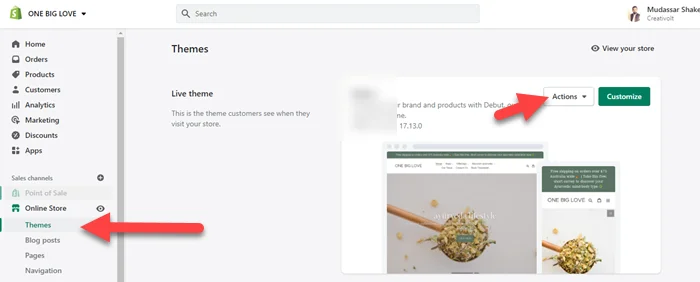
Shopify Theme

Step 2: Click on Action > Edit code
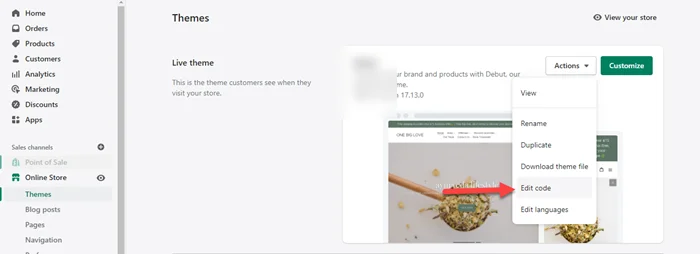
Shopify Edit Code

Step 3: Now under Assets > click theme.css
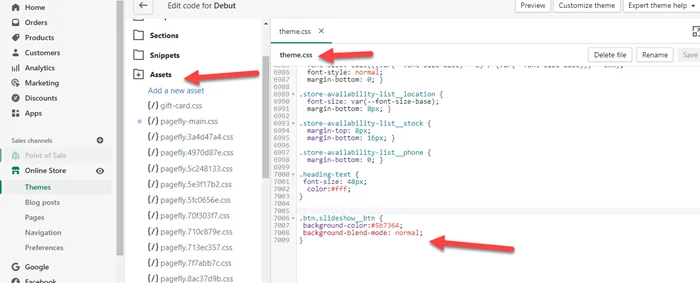
Add Custom Css Shopify

We hope this article helped you learn how to add custom CSS to shopify. You may also want to get help from our shopify expert.

If you liked this article, then please subscribe to our YouTube Channel for web, windows, tech, and how-tos tutorials. You can also find us on Twitter and Facebook.

See also  Elementor Pro Hosting | Best Hosting For Elementor
Post Tags: #Css#Shopify#Website builder
Facebook FacebookTwitter TwitterInstagram InstagramPinterest PinterestYouTube YouTube

© 2026 Mc Starters

  • Guest Posts
  • HTML Sitemap
  • XML Sitemap
  • llms.txt
  • Affiliate Disclosure
Get Professional Websites
  • Categories
    • AI
    • Business
    • CRM
    • Divi
    • Elementor
    • Email Marketing
    • Hosting
    • Insurance
    • Kinsta Hosting
    • make.com
    • Mega Menu
    • Review
    • Science and Technology
    • SEO
    • Shopify Tutorials
    • Squarespace
    • Tips and Tricks
    • Tools
    • Upwork
    • Webflow Tutorials
    • Website
    • Windows 10
    • Windows 11
    • WordPress
    • WordPress Plugins
    • WordPress Theme
  • Our Services
  • Write for Us
  • Tools
Facebook X Instagram YouTube Pinterest
Search