
Elementor is a fantastic page builder, and it is the most popular page builder for WordPress. They have hundreds of Elementor header, footer and full page templates.
Download Free Elementor Templates and Make Website in Less Time and without coding.
Elementor Pro comes with a header builder. With header builder, we easily add menus, logos, and icons. But some developers want to Change Elementor Default hamburger Menu Icon into custom icons, custom images, and text.
Get Best Page Builder: Elementor Pro
In this post, I will show you how to change an elementor hamburger menu icon without having to use a plugin.
Add Text to Elementor Hamburger Menu Icon
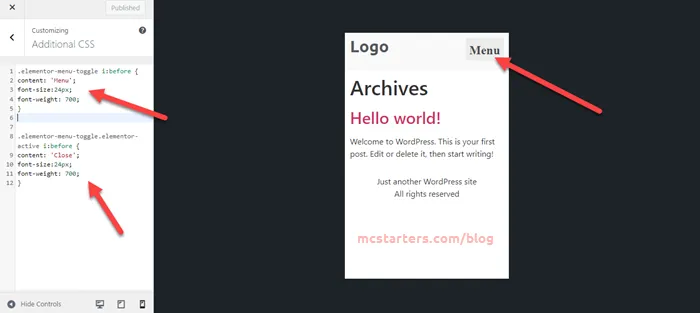
Step 1: Copy below code and paste into Appearance > Customize > Additional CSS.
Step 2: You can replace “Menu” text with any text you want.
.elementor-menu-toggle i:before {
content: 'Menu';
font-size:24px;
font-weight: 700;
}
.elementor-menu-toggle.elementor-active i:before {
content: 'Close';
font-size:24px;
font-weight: 700;
}
Add own image icon to Elementor Hamburger Menu Icon
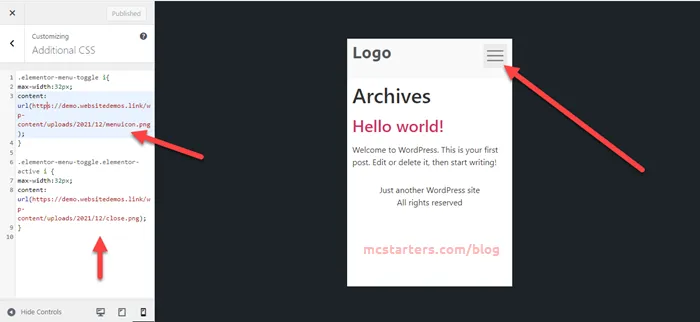
Step 1: Copy below code and paste into additional CSS.
Step 2: Replace image with own image Url.
.elementor-menu-toggle i{
max-width:32px;
content: url(https://mcstarters.com/wp-content/uploads/2021/12/menuicon.png;
}

.elementor-menu-toggle.elementor-active i {
max-width:32px;
content: url(https://mcstarters.com/wp-content/uploads/2021/12/close.png;
}
Add custom icon to Elementor Hamburger Menu Icon
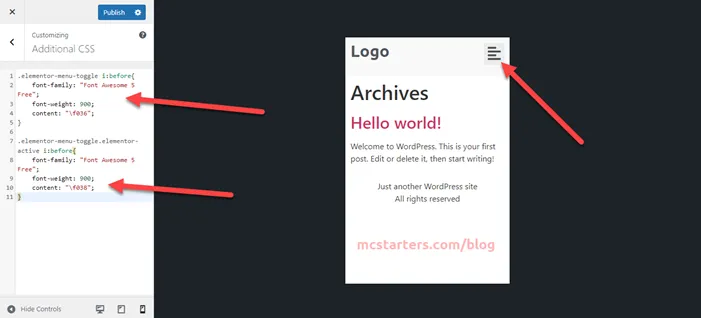
Step 1: Copy below code and paste into WordPress child theme or Additional CSS.
Step 2: Get more icon code here if you want to change icons.
.elementor-menu-toggle i:before{
    font-family: "Font Awesome 5 Free";
    font-weight: 900;
    content: "f036";
}

.elementor-menu-toggle.elementor-active i:before{
    font-family: "Font Awesome 5 Free";
    font-weight: 900;
    content: "f038";
}
Video Tutorial:
That’s it! If you have any questions, feel free to comment below.
For Problem Solution and Web Design: Hire Elementor Expert.