
Security is the main issue if you have a website. Changing your WordPress login URL is the best way to improve WordPress website security. So, today we show you 5 steps.
You Might Also Like: Free Elementor Website Templates
The benefit of change your WordPress login URL
- Hide login page URL and make it access harder for hackers.
- It help to improve Security
Follow Steps:
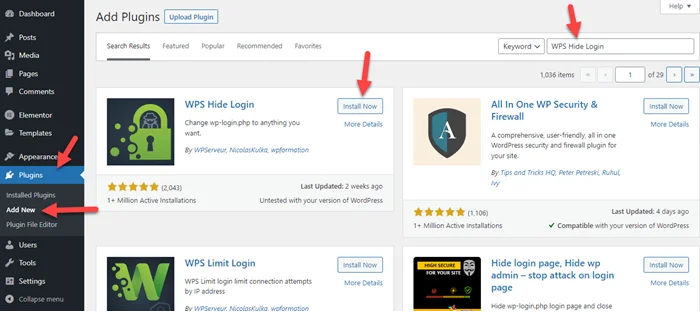
Step 1: Go to Plugins > Add New > Search WPS Hide Login > Install and Activate
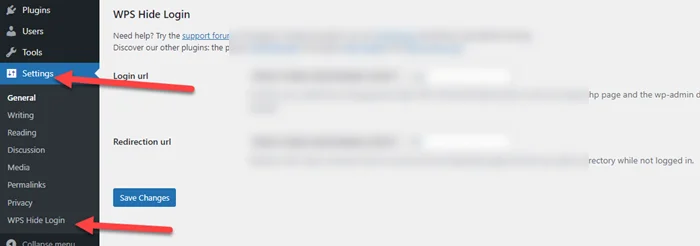
Step 2: Go to Setting > Click on “WPS Hide Login“
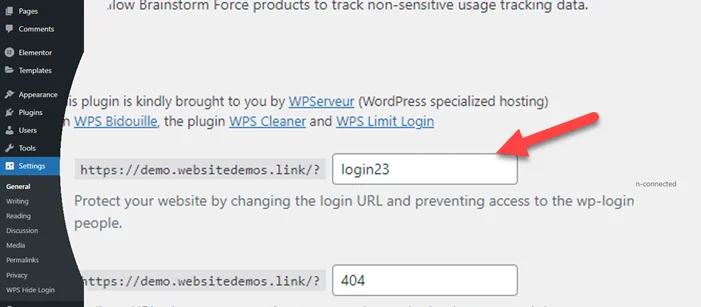
Step 3: Enter the word in the Login URL field. that you want to replace with wp-admin. Last click on “Save Changes”.
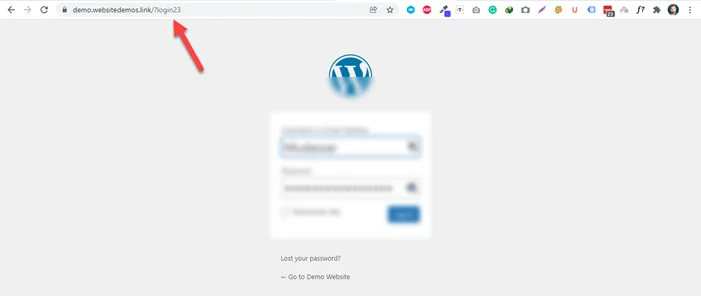
Step 4: Now you see the login URL at the top. Please bookmark this or remember this URL.

Step 5: Last go to URL and see it work or not.
It’s done. If you face any issues then let me know we will help or comment below.
Frequently Asked Question
How to hide wp admin URL?
We hide wp admin URL with the help of the “WPX Hide Login” plugin. It helps you to change WordPress URLs easily without any coding knowledge.
Should you change WP admin URL?
I think yes because of security.