
Looking for professionally designed Elementor Post Grid Templates? Mc Starters offers a growing collection of modern, responsive post grid layouts that help you display blog posts, portfolios, news articles, case studies, and custom post types in an attractive, organized format.
Every template is fully customizable with Elementor and built using dynamic widgets, allowing your latest content to populate automatically without any coding. Browse and download the latest Elementor Post Grid Templates from the Mc Starters Template Library.
Why Use Elementor Post Grid Templates?
A post grid is one of the most important sections of any content-driven website. Instead of displaying articles in a simple chronological list, a grid layout organizes your content into visually appealing cards that make browsing easier and encourage users to click.
With Elementor Pro, you can build dynamic post grids using the Loop Grid, Posts widget, or custom templates that automatically display your latest content.
Using professionally designed Elementor Post Grid Templates helps you:
- Improve user engagement
- Increase page views
- Lower bounce rates
- Highlight featured content
- Showcase images more effectively
- Maintain consistent branding
- Improve mobile responsiveness
- Create modern magazine-style layouts
- Enhance portfolio presentation
- Increase click-through rates
Whether you’re running a personal blog, digital agency, online magazine, WooCommerce store, or SaaS website, choosing the right post grid layout creates a better browsing experience for your visitors.
Download Free Elementor Post Grid Templates
4 Best Elementor Post Grid Templates
Your content deserves more than a basic list of blog posts. Whether visitors land on your homepage, blog page, or a custom landing page, the way you present your articles has a direct impact on user engagement, click-through rates, and time spent on your website.
A professionally designed Elementor Post Grid Template transforms ordinary content into a visually engaging experience that encourages readers to explore more of your website.
In this guide, we’ll explore 4 high-converting Elementor Post Grid Templates, explain their unique layouts, highlight their best use cases, and share expert tips for building beautiful, fast-loading post grids with Elementor.
Elementor Post Grid 01 – Structured Card Layout
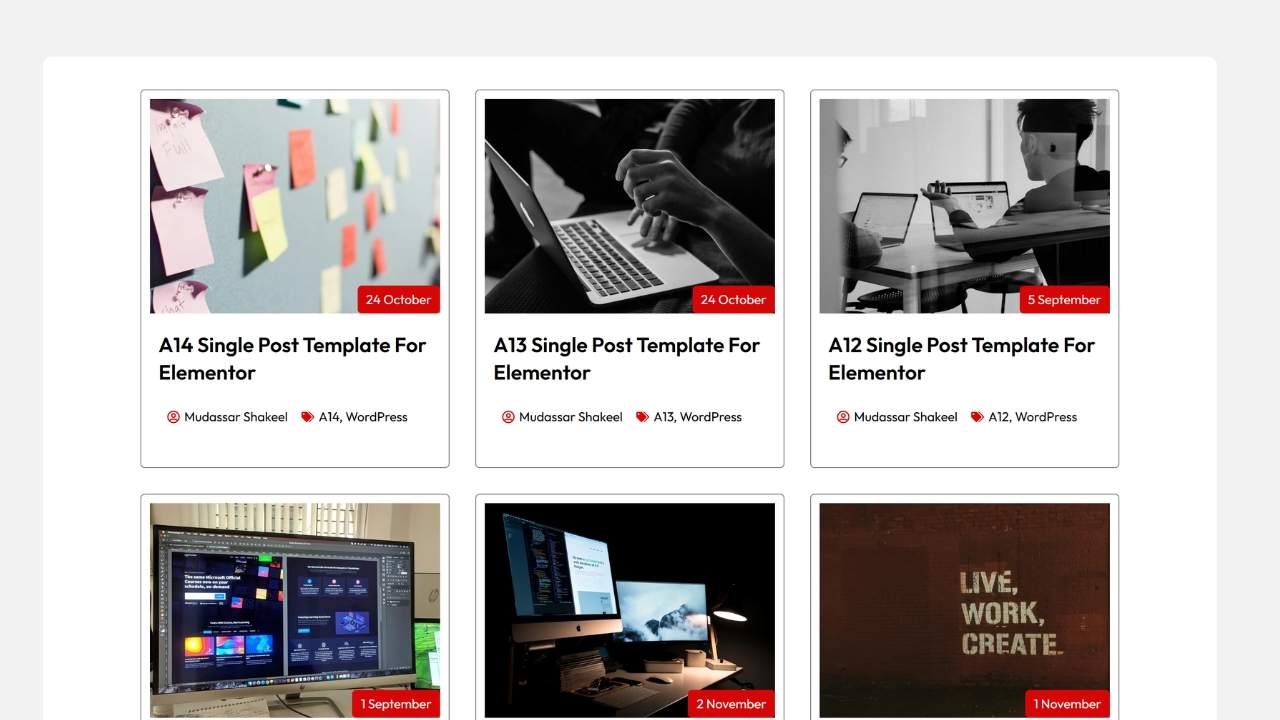
The Layout
This template uses a clean and balanced three-column grid where each article is displayed inside a separate white content card. The generous spacing between cards creates a modern appearance while making every article easy to distinguish.
Key Features
- Three-column responsive layout
- Large featured images
- Author and date metadata
- Clean typography
- Consistent spacing
- Modern card design
- Read More buttons
- Responsive layout for all devices
Best Used For
- Business blogs
- Company news
- Online magazines
- Educational websites
- Digital publications
The structured layout helps readers scan multiple articles quickly while maintaining a clean professional appearance.
Elementor Post Grid 02 – Minimalist Full-Image Grid
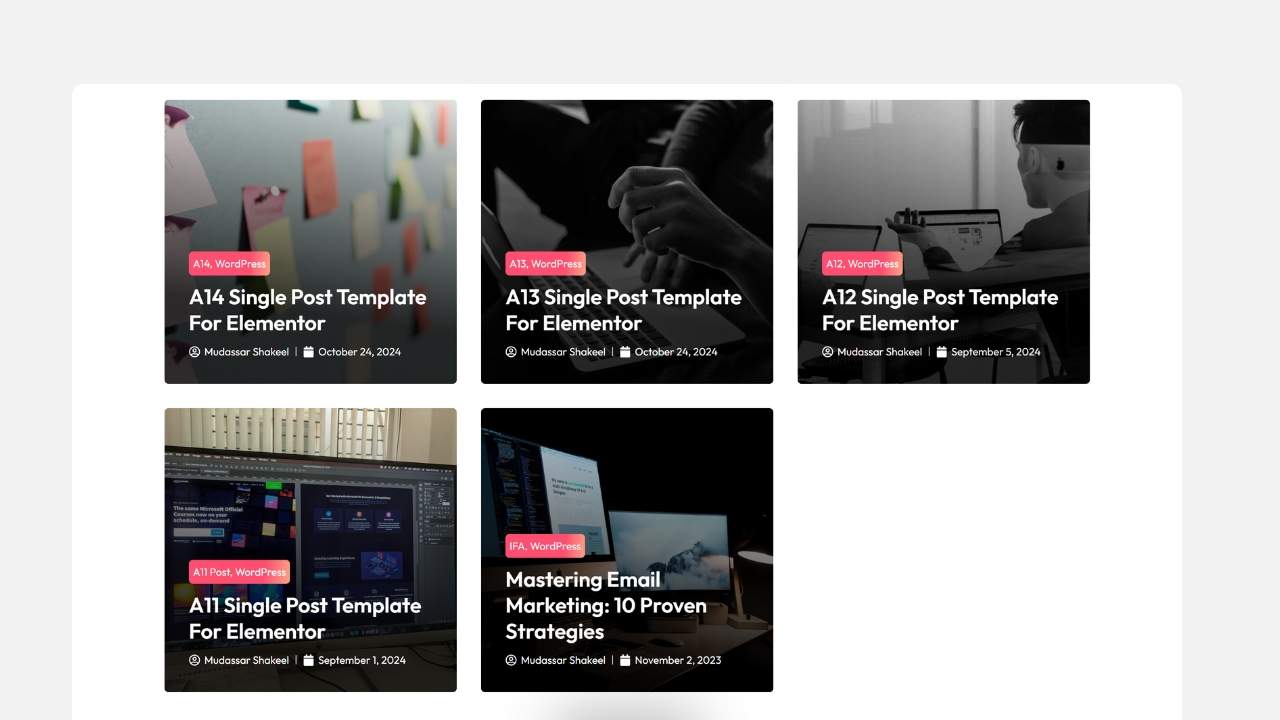
The Layout
This modern design removes traditional white cards and instead allows featured images to dominate the layout. Text overlays appear directly on top of darkened images, creating an immersive visual experience.
Key Features
- Full-image cards
- Category labels
- Overlay typography
- Minimal white space
- Bold visual presentation
- Modern hover effects
Best Used For
- Photography portfolios
- Lifestyle blogs
- Travel websites
- Creative agencies
- Fashion magazines
Because the imagery becomes the primary focus, this layout works exceptionally well for websites that rely heavily on visual storytelling.
Looking for More Elementor Templates?
Complete your website with professionally designed:
- Post Grid Templates
- Blog Archive Templates
- Single Post Templates
- Mega Menu Templates
- Popup Templates
- Header & Footer Templates
Elementor Post Grid 03 – Modern Shadow Grid
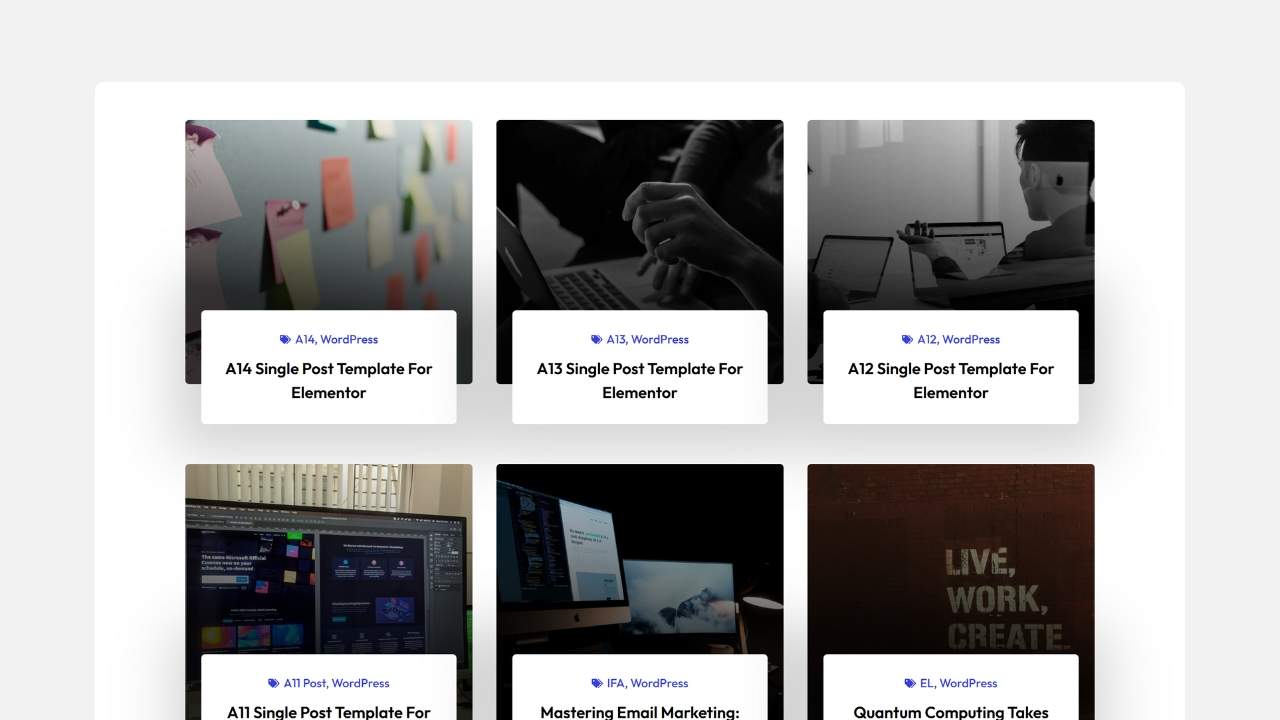
The Layout
This layout introduces subtle drop shadows beneath each content card to create depth and separation from the page background. The result is a modern interface that feels clean, spacious, and premium.
Key Features
- Soft card shadows
- Spacious margins
- Large featured images
- Elegant typography
- Modern UI styling
- Responsive card layout
Best Used For
- SaaS companies
- Startup websites
- Technology blogs
- Marketing agencies
- Creative professionals
This template balances readability and aesthetics, making it ideal for businesses that want a polished, contemporary look.
Elementor Post Grid 04 – Clean Editorial List Row
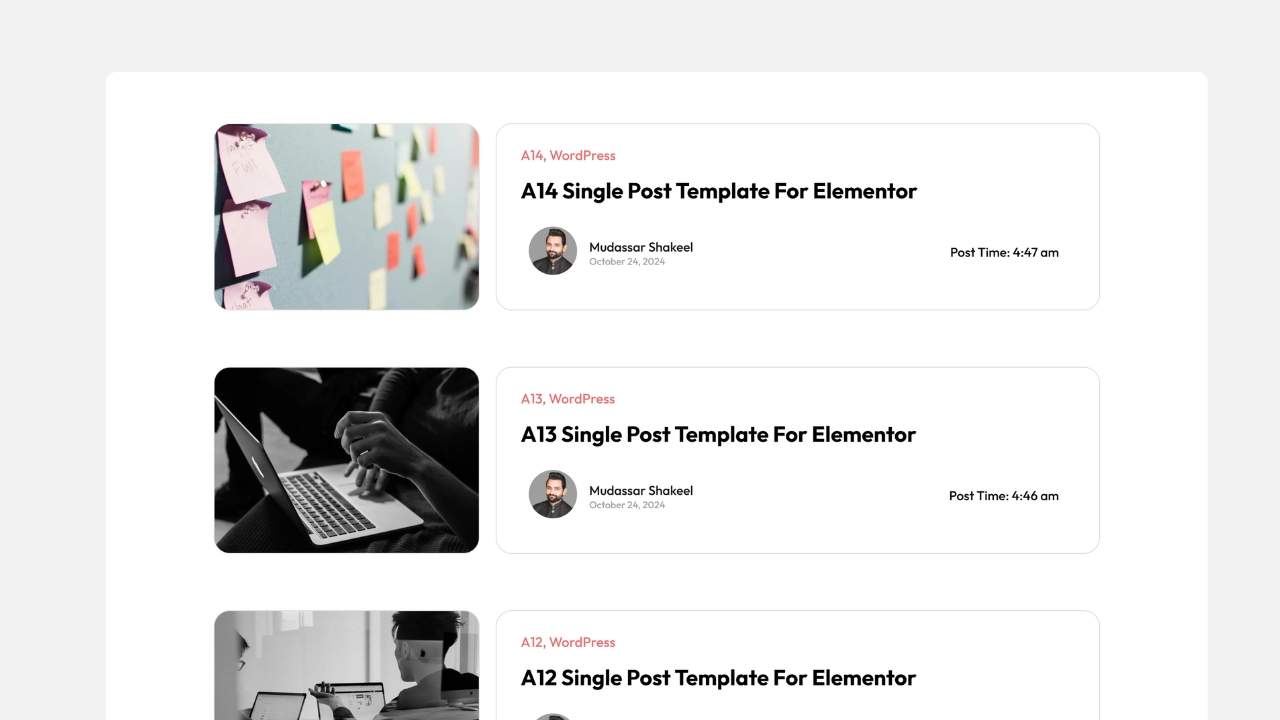
The Layout
Instead of displaying posts in traditional cards, this template uses wide horizontal rows. A thumbnail image sits on the left while the article title, author information, category, and excerpt appear on the right.
Key Features
- Horizontal content layout
- Large reading area
- Compact thumbnails
- Author profile display
- Category indicators
- Editorial styling
Best Used For
- Personal blogs
- Author websites
- Review platforms
- News publications
- Documentation websites
Because more space is dedicated to titles and excerpts, this design works particularly well for long-form content and informational websites.
Benefits of Using Elementor Post Grid Templates
Choosing a professionally designed post grid isn’t just about aesthetics. It also improves how users interact with your content.
Some of the biggest benefits include:
Better User Experience
Visitors can browse multiple articles quickly without feeling overwhelmed.
Improved Internal Navigation
Post grids naturally encourage users to explore additional articles, increasing page views and session duration.
Stronger Visual Branding
A custom grid layout reinforces your brand identity through consistent colors, typography, spacing, and imagery.
Higher Engagement
Eye-catching featured images combined with clean layouts improve click-through rates.
Easier Content Discovery
Category labels, author information, and excerpts help users find relevant content faster.
Download Elementor Post Grid Templates
Save hours of design time with ready-to-use Elementor layouts built for blogs, portfolios, agencies, and business websites.
Pro Tips for Customizing Elementor Post Grid Templates
1. Add Hover Effects
Small hover animations make your grids feel more interactive.
Popular hover effects include:
- Slight image zoom
- Card lift animation
- Shadow expansion
- Button fade-in
- Border color transitions
These subtle interactions encourage visitors to click.
2. Optimize Images for Speed
Large images can significantly slow down your website.
For better performance:
- Use Medium or Large image sizes instead of Full Resolution.
- Compress images before uploading.
- Enable lazy loading.
- Use modern image formats such as WebP where possible.
A faster website improves both user experience and SEO.
3. Use Pagination or Load More
Displaying dozens of posts on one page can increase load times and overwhelm visitors.
Instead, use:
- AJAX Load More buttons
- Infinite scrolling
- Numbered pagination
- Previous/Next navigation
This keeps browsing smooth while reducing initial page load.
4. Display Dynamic Content
Take advantage of Elementor’s dynamic widgets to display:
- Featured Images
- Post Titles
- Categories
- Tags
- Author Names
- Publication Dates
- Reading Time
- Custom Fields
- Comment Counts
Dynamic content ensures every new article automatically appears in your grid without manual updates.
5. Keep Card Heights Consistent
Uniform cards create a cleaner, more professional layout.
To maintain consistency:
- Use equal image aspect ratios
- Limit excerpt length
- Standardize button sizes
- Maintain equal spacing
- Use consistent typography
This results in a polished and balanced design.
6. Design with Mobile Users in Mind
A significant portion of website traffic comes from smartphones.
Make sure your post grids:
- Stack properly on smaller screens
- Use touch-friendly spacing
- Maintain readable typography
- Resize images correctly
- Load quickly on mobile devices
Elementor’s responsive editing tools make optimizing for every screen size simple.
Frequently Asked Questions
What is an Elementor Post Grid Template?
An Elementor Post Grid Template is a pre-designed layout that dynamically displays blog posts, portfolios, news articles, or custom post types in an organized grid or list using Elementor widgets.
Do I need Elementor Pro?
Yes. While Elementor offers basic post widgets, Elementor Pro provides advanced features like Loop Grid, Theme Builder, dynamic tags, and custom templates.
Can I customize these templates?
Absolutely. You can edit colors, typography, spacing, buttons, hover effects, layouts, and dynamic content directly within Elementor.
Will these templates work with any WordPress theme?
Yes. They are compatible with most Elementor-friendly themes, including Hello Elementor, Astra, Kadence, GeneratePress, and Blocksy.
Are these templates responsive?
Yes. Every Mc Starters Post Grid Template is designed to adapt seamlessly to desktop, tablet, and mobile devices.
Can I display custom post types?
Yes. Elementor’s query controls allow you to display custom post types, portfolios, case studies, WooCommerce products, and more.
Which template is best for image-heavy websites?
The Minimalist Full-Image Grid (Template 02) is ideal for photography, travel, fashion, and creative portfolios where visuals play a major role.
Final Thoughts
A professionally designed Elementor Post Grid Template helps you present your content in a way that’s visually appealing, easy to browse, and optimized for user engagement. Whether you prefer structured card layouts, immersive image grids, modern shadow effects, or editorial list designs, the right template can dramatically improve how visitors interact with your website.
The four templates featured in this guide are suitable for blogs, agencies, startups, online magazines, portfolios, educational websites, and business platforms. Combined with Elementor’s dynamic widgets and responsive design tools, they provide a flexible foundation for creating beautiful content sections that keep readers engaged.
Ready to upgrade your website? Explore the latest Elementor Post Grid Templates from Mc Starters and build modern, high-performing content layouts in minutes.
Build Your Entire Website with Mc Starters
Looking for more than Post Grid Templates? Mc Starters also offers professionally designed:
- Blog Archive Templates
- Single Post Templates
- Popup Templates
- Mega Menu Templates
- Headers
- Footers
- Landing Pages
- WooCommerce Templates