
Are you looking for a way to Enable Elementor Editor for Different Custom Post Types?
Custom post types are a game-changer when it comes to WordPress. They allow you to organize and display different types of content on your website beyond the standard posts and pages. Whether you’re managing a portfolio, showcasing team members, or presenting events, custom post types give you the flexibility to structure your content precisely as you envision it.
Unlocking the power of customization in WordPress has never been easier. If you’ve ever wanted to take control of your custom post types, such as Products or Testimonials, and infuse them with your unique style, you’re in the right place.
In this guide, we’ll walk you through a simple and efficient process to seamlessly integrate Elementor, the beloved page builder, into your custom post types. Say goodbye to the limitations and hello to endless possibilities as we explore how to transform your content with ease. Let’s dive in and enhance your WordPress experience.
Enable Elementor Editor for Different Custom Post Types
The simplest way to enable Elementor for custom post types is by using these steps. Here’s how:
Step 1: In the WordPress Dashboard, go to Elementor > Settings.
Step 2: Check the custom post type you want to edit with Elementor under “Post Types” and save changes.
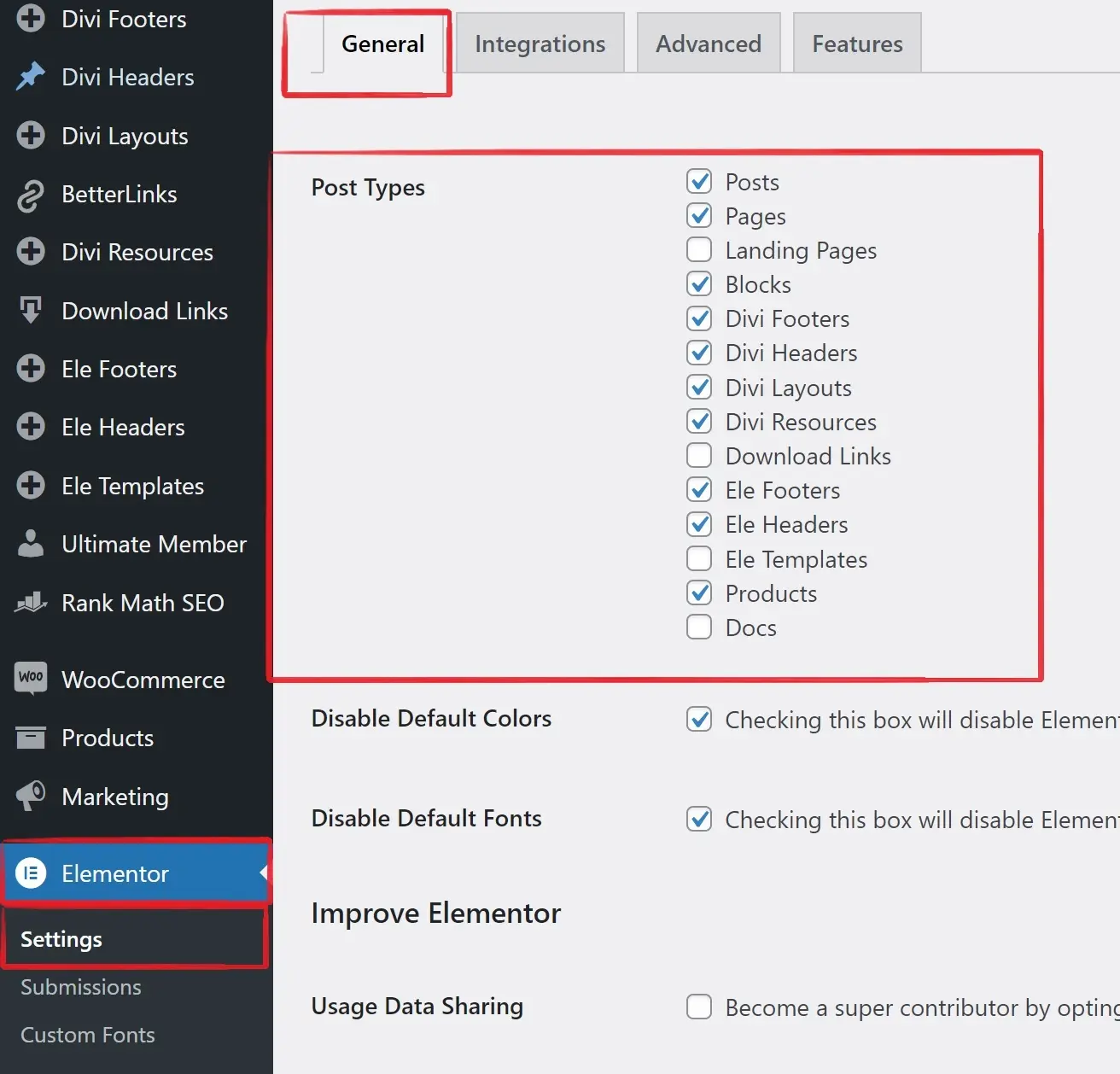
Step 3: Find your custom post (e.g., Products) in the dashboard, and click “Edit with Elementor” to start customizing.
Remember, for dynamic content templates, use Mc Starters single post templates to create a Single post-type template. Otherwise, your design will apply to only one custom post.
Conclusion
In this guide, we’ve demystified the process of enabling Elementor for custom post types in WordPress. With just a few simple steps, you can unlock a world of creative possibilities, allowing you to design and style your custom content types with ease.
Custom post types empower you to showcase your content in a unique and structured manner, whether you’re running a business website, a portfolio, or a blog with diverse content. Elementor, with its intuitive drag-and-drop interface, seamlessly integrates with these custom post types, putting the power of design back into your hands.