Skip to content
Mc Starters Logo

Mc Starters

  • CategoriesExpand
    • AI
    • Business
    • CRM
    • Divi
    • Elementor
    • Email Marketing
    • Hosting
    • Insurance
    • Kinsta Hosting
    • make.com
    • Mega Menu
    • Review
    • Science and Technology
    • SEO
    • Shopify Tutorials
    • Squarespace
    • Tips and Tricks
    • Tools
    • Upwork
    • Webflow Tutorials
    • Website
    • Windows 10
    • Windows 11
    • WordPress
    • WordPress Plugins
    • WordPress Theme
  • Write for Us
Download 300+ Templates
Mc Starters Logo
Mc Starters

Blog \ WordPress \ How To Fix Replytocom Links Issue in WordPress

How To Fix Replytocom Links Issue in WordPress

Published By :Mudassar Shakeel Updated On : March 15, 2024 WordPress
📌 Summarize this content with AI
ChatGPT Grok Google AI Perplexity Claude
Fix Replytocom Links Issue in WordPress

One of my clients faced a ReplyToCom links issue in WordPress website. We will fix this issue with the URL parameters. Replytocom links generate whenever you “Reply” to comments.

You Might Also Like: Free Elementor Website Templates

Fix Replytocom Links Issue in WordPress

For fixing the Replytocom issue you need to follow the below steps.

Step 1: Open Google Search Console > Under Legacy Tools and reports > Click on “URL Parameters”.
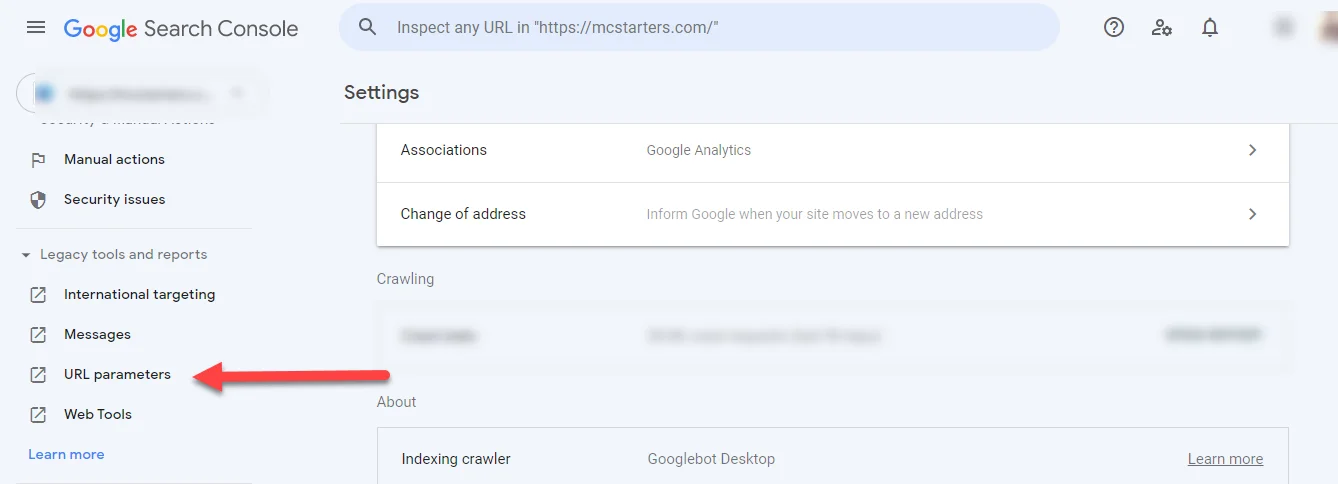
URL Paramaters

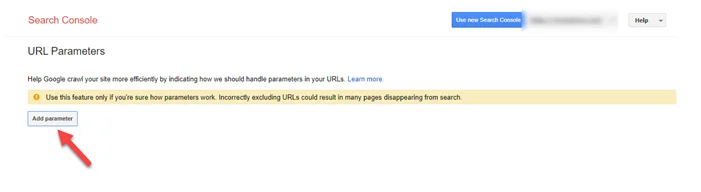
Step 2: Click on “Add Parameter”

Add URl Parameters

Step 3: Now you enter “replytocom” in the parameter field and set other actions as shown in the picture below.
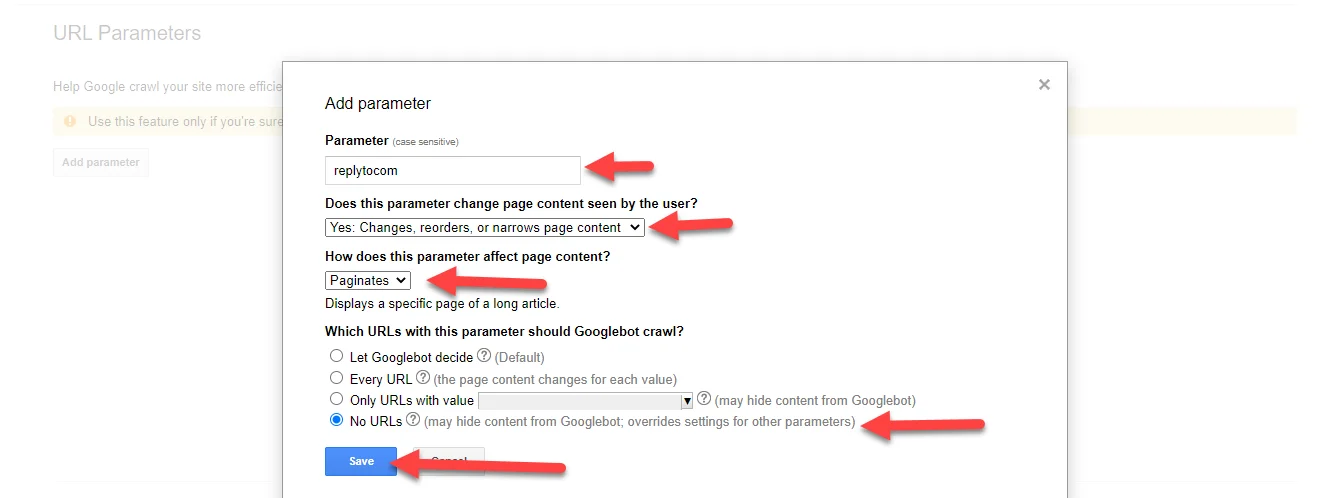
Fix Replytocom Links Issue

Fix Replytocom Links Issue in WordPress using Robots.txt file

Step 1: Open the robots.txt file and copy the below line.

Disallow: *?replytocom

Step 2: Paste the line at the end of the robots.txt file.
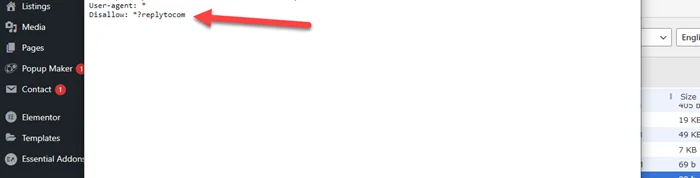
replytocom fix with robots.txt

I hope you fix this issue after these steps but if you still need any help then comments below.

See also  6 Best Free WordPress Themes For Elementor
Facebook FacebookTwitter TwitterInstagram InstagramPinterest PinterestYouTube YouTube

© 2026 Mc Starters

  • Guest Posts
  • HTML Sitemap
  • XML Sitemap
  • llms.txt
  • Affiliate Disclosure
  • Categories
    • AI
    • Business
    • CRM
    • Divi
    • Elementor
    • Email Marketing
    • Hosting
    • Insurance
    • Kinsta Hosting
    • make.com
    • Mega Menu
    • Review
    • Science and Technology
    • SEO
    • Shopify Tutorials
    • Squarespace
    • Tips and Tricks
    • Tools
    • Upwork
    • Webflow Tutorials
    • Website
    • Windows 10
    • Windows 11
    • WordPress
    • WordPress Plugins
    • WordPress Theme
  • Write for Us
Facebook X Instagram YouTube Pinterest
Search