
GoHighLevel automations follow up with leads correctly when they respond within minutes, mix channels (text, email, call task), stop the moment a lead replies, and adjust based on what the lead actually does — not on a rigid, one-size-fits-all delay timer.
Why Most GoHighLevel Follow-Up Automations Fail
Most businesses set up GoHighLevel, build one workflow, and assume the job is done. Then leads stop responding and nobody knows why.
The usual culprits:
- The first message goes out too slowly. Leads that don’t hear back within 5 minutes are dramatically less likely to convert than ones contacted instantly.
- Every lead gets the same sequence, regardless of source, intent, or how they’ve already responded.
- The workflow never stops. A lead replies “not interested” and still gets three more emails that week.
- Everything lives in one channel. Email-only sequences get buried; SMS-only sequences feel spammy without context.
Fixing this isn’t about adding more automations. It’s about making the ones you have actually behave like a good salesperson would.
Tired of Leads Slipping Through the Cracks?
A GoHighLevel setup that’s built wrong quietly costs you leads every single day. Get a CRM and automation build that’s actually configured to hold onto them.
Start With the Instant Response Workflow
This is the single highest-impact automation in GoHighLevel, and it should be the first thing you build.
What it needs to do
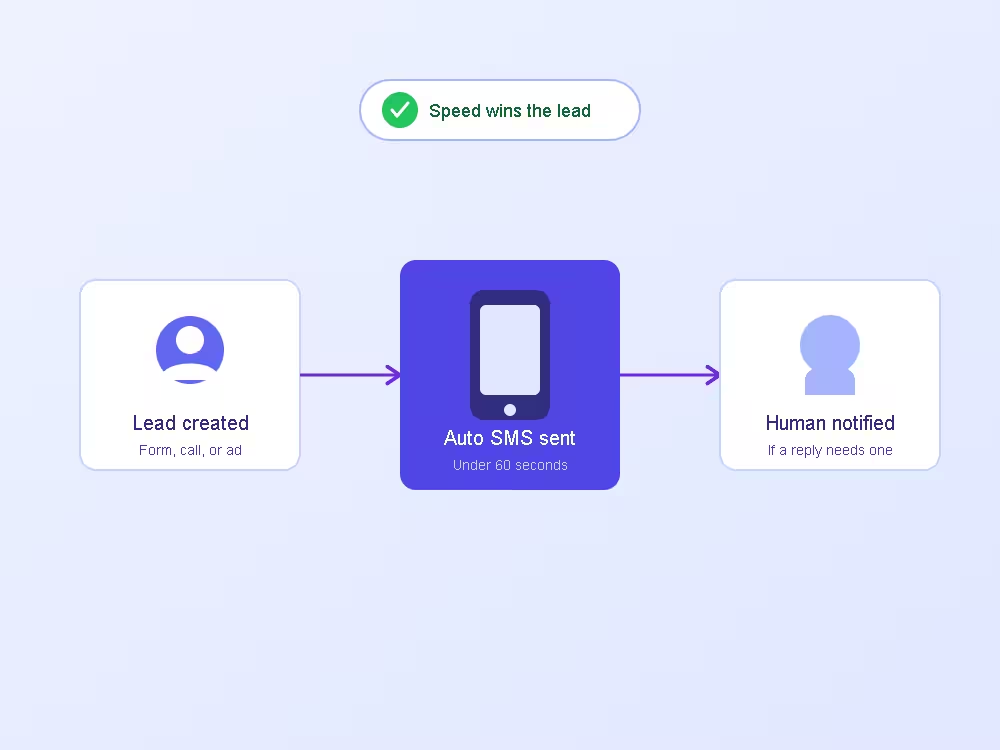
- Trigger the moment a lead is created — form fill, missed call, chat widget, ad lead, or manual entry.
- Send an SMS within 60 seconds. Keep it short: confirm you got their info, tell them what happens next, and ask one simple question.
- Send a follow-up email a few minutes later with more detail, in case they prefer email or the text doesn’t land.
- Create a task for a human if the lead replies with a question the automation can’t answer.
Missed call text back
If you’re using GoHighLevel setup as your primary CRM, the missed-call-text-back feature deserves its own workflow. When a call goes unanswered, GoHighLevel can fire an automatic text within seconds — often the difference between a lead who calls a competitor next and one who stays in your pipeline.
Build Branching Logic, Not a Straight Line
A single linear sequence treats every lead the same, which is exactly the problem. GoHighLevel’s workflow builder supports conditional branches — use them.
Branch by source
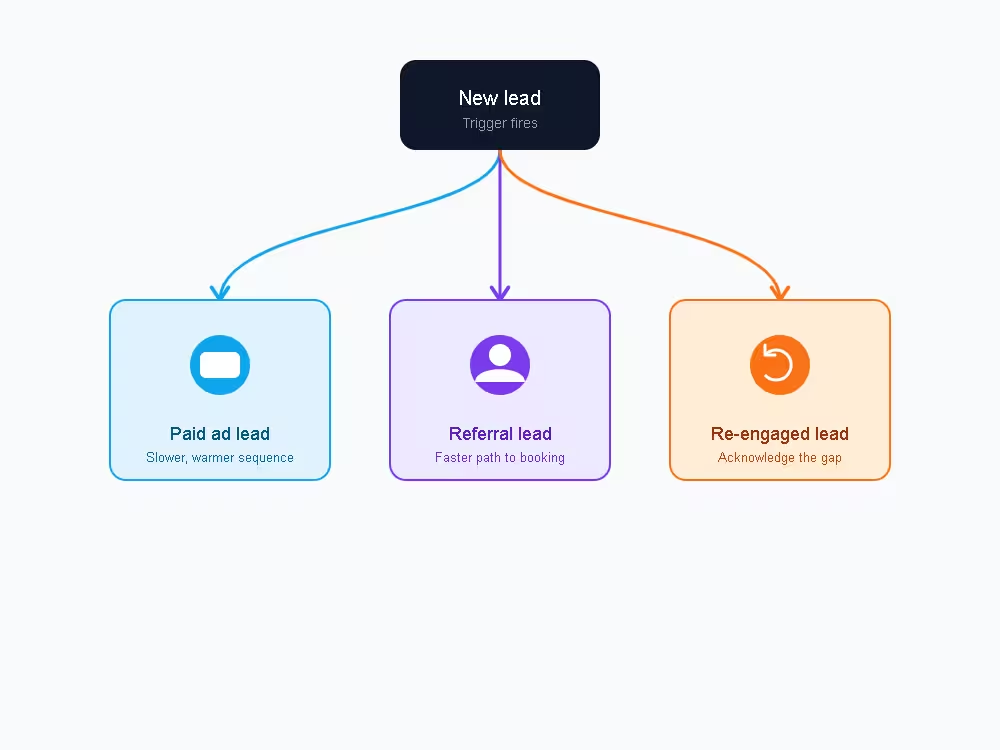
A lead from a paid ad, a referral, and an old lead list re-engagement campaign are not in the same headspace. Split your workflow at the trigger:
- Ad leads — assume lower intent, warm them up over more touches.
- Referral leads — assume higher trust, move faster to a booking link.
- Re-engaged leads — acknowledge the gap (“it’s been a while”) instead of pretending it’s a fresh conversation.
Branch by behavior
Add “if/else” steps that check what the lead actually did:
- Did they open the email? If not, try SMS next instead of another email.
- Did they click the booking link? If yes, stop the nurture sequence and move them to a reminder sequence instead.
- Did they reply with a question? Route to a team inbox notification, not the next scheduled message.
This is where GoHighLevel automations stop feeling robotic and start feeling like they’re actually paying attention.
Stop Guessing at Your Follow-Up Sequence
Branching logic takes real workflow-building experience to get right the first time. We can map, build, and test your GoHighLevel automations so leads never fall into a dead-end path.
Mix Channels Deliberately
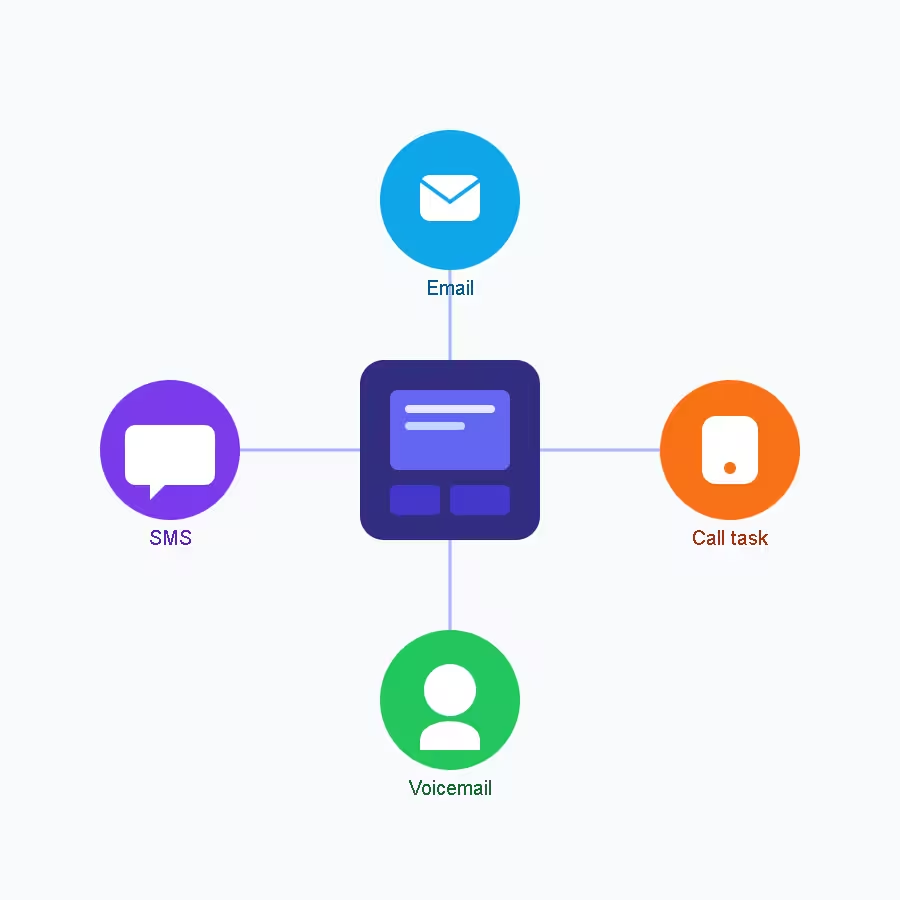
Relying on one channel is the fastest way to lose leads who simply don’t check that channel often. A well-built sequence rotates across:
| Channel | Best for | Timing |
|---|---|---|
| SMS | Immediate acknowledgment, quick questions | First 5 minutes, then sparingly |
| Detail, social proof, longer explanations | Hours 1–72 | |
| Voicemail drop | High-intent leads who haven’t responded | Day 2–3 |
| Task for a human call | Leads showing buying signals | Anytime a trigger fires |
Don’t stack all four in one day — that reads as desperate. Spread them across a 7–14 day window, tapering frequency as the sequence progresses.
Set Exit Conditions on Every Workflow
An automation without an exit condition doesn’t know when to stop, and that’s how businesses end up texting someone who already bought or already said no.
Build these stop triggers into every sequence:
- Lead replies with any message (route to a human, exit the automation)
- Lead books an appointment
- Lead is marked “Do Not Contact”
- Opportunity status changes to “Won” or “Lost”
- A set number of no-response touches is reached (then move them to a long-term nurture, not silence)
Use Pipeline Stage Automations to Keep Deals Moving
Follow-up doesn’t end once a lead responds — it just changes shape. Tie automations to pipeline stage changes so nothing goes quiet mid-deal:
- New Lead → Contacted: confirm the next step in writing.
- Contacted → Appointment Booked: send a confirmation and a reminder sequence.
- No-show: trigger a re-booking SMS within the hour, while it’s still top of mind.
- Proposal Sent: schedule a check-in 2–3 days later if there’s been no response.
This turns your pipeline from a static list into something that actively pushes deals forward.
Review and Prune Your Automations Regularly
Automations aren’t “set and forget.” Check monthly:
- Which sequences have the highest reply rates? Do more of that.
- Which messages get marked as spam or unsubscribes? Rewrite or remove them.
- Are any workflows still referencing an old offer, price, or booking link?
A GoHighLevel account that’s never been audited tends to accumulate dead workflows that quietly hurt deliverability for everything else.
Conclusion
GoHighLevel automations only work when they’re built to respond fast, branch based on real lead behavior, mix channels intentionally, and know when to stop. Get those fundamentals right and your follow-up stops feeling like a mass broadcast and starts feeling like a team member who never misses a lead.
Frequently Asked Questions
How fast should a GoHighLevel automation respond to a new lead?
Within 5 minutes, ideally under 60 seconds for the first SMS. Response speed is one of the strongest predictors of whether a lead converts, so this should be the very first workflow you build.
Can GoHighLevel automatically text back missed calls?
Yes. GoHighLevel’s missed-call-text-back feature sends an automatic SMS the moment a call goes unanswered, which keeps the lead engaged instead of letting them call a competitor next.
How many follow-up touches should a lead nurture sequence include?
Most effective sequences use 6–10 touches spread across 7–14 days, mixing SMS, email, and occasional voicemail drops, tapering off in frequency as the sequence progresses.
What’s the biggest mistake people make with GoHighLevel workflows?
Building one linear sequence for every lead regardless of source or behavior, and forgetting to add exit conditions so the automation keeps messaging leads who already replied, booked, or opted out.
Do GoHighLevel automations need to be reviewed after setup?
Yes. Reply rates, unsubscribe rates, and outdated links or offers should be checked monthly. Automations that are never revisited tend to accumulate dead workflows that hurt overall deliverability.
Ready to Fix Your Lead Follow-Up for Good?
Whether you need a full GoHighLevel build or just a tune-up on existing workflows, we’ll make sure every lead gets a fast, relevant, well-timed response.