
The ‘Made in Webflow’ badge shows on your webflow site by default. Hiding the “Made in webflow” badge or webflow branding is a common request for those who want to maintain a professional and customized website appearance.
hide ‘made in Webflow badge’
Here’s a step-by-step guide on how to hide the ‘Made in webflow’ badge:
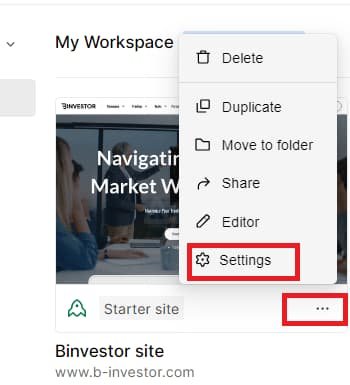
Step 1: Go to the projects “Settings”
Step 2: Scroll down to “Webflow Branding” and toggle off

Step 3: Click Save changes
Following these steps, you can hide the “Made in Webflow” badge on your website, giving it a more customized personal and professional look. Remember to keep a backup of your project and code in case you need to revert any changes in the future.
How do I remove the Webflow badge custom code?
Upgrade to a paid plan, access project settings, and disable the badge in branding settings.
How do I remove the “Made in Webflow” icon?
Upgrade to a paid plan, go to project settings, and disable it in branding settings.
Can you remove the “Made in Webflow”?
Yes, by upgrading to a paid webflow plan and adjusting branding settings in your project.