
Integrating Elementor forms with GetResponse can significantly enhance your email marketing strategies by efficiently capturing leads directly from your WordPress site.
GetResponse is a digital marketing platform offering a suite of tools for email marketing, automation, creating landing pages, and hosting webinars. It’s known for its robust email marketing capabilities, including customizable templates, autoresponders, and analytics.
Step by step guide to integrate Elementor Form to GetResponse
Here is a step-by-step guide to integrate Elementor form to GetResponse.
Step 1: An active GetResponse account is important. Here you get your API Key from GetResponse
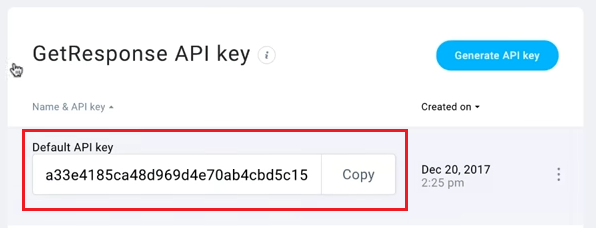
Step 2: First, set your GetResponse API Key in the Integrations Settings. Under Elementor > Settings > Integrations Tab
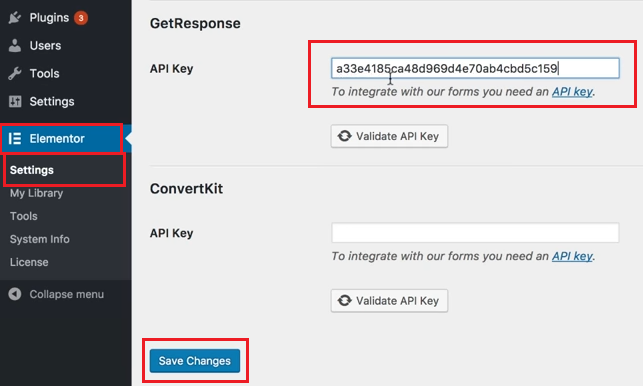
Step 3: Create a form using the Elementor Form Widget
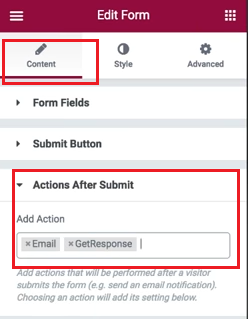
Step 4: Click Actions After Submission. Under Add Action choose GetResponse
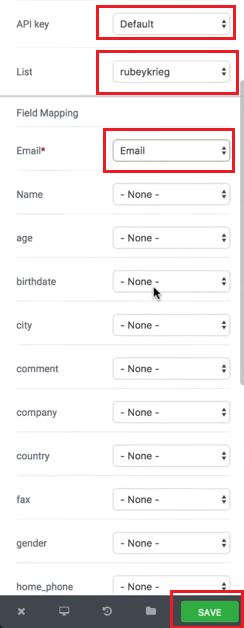
Step 5: Match your Form Fields to GetResponse’s fields through the Field Mapping options
By following these steps, you can integrate Elementor forms with GetResponse, allowing for efficient data collection and management for your email marketing or contact management activities.
Conclusions
Integrating Elementor forms with GetResponse streamlines your lead-capturing process, making it an efficient tool for your email marketing campaigns. Regularly update and optimize your forms to ensure the best performance.