
Did you find a method to reverse columns on mobile in Divi? Follow these steps to change the reverse columns on mobile in Divi using the code.
Divi Footer SEO: Optimize Your Site’s Bottom Line for Rankings
If you’re using the Divi theme for your WordPress site and wondering how to rearrange columns precisely for mobile users, you’re in luck. This easy-to-follow guide will show you a straightforward method to reverse column order on mobile devices within the Divi Builder, with no complex coding required.
Let’s do it!
Reverse Columns on Mobile in Divi: Step-by-step
If you’re using the Divi theme for your WordPress website and want to change the order of columns on mobile devices, you’re in the right place. In this Divi tutorial, we’ll walk you through the steps of how to reverse columns on Mobile in Divi without using complex code.
Step 1: Edit your page using Divi Builder. Open Row Settings for your chosen row.
Step 2: In the “Advanced” tab, under “CSS ID & Classes,” add “reverse” to the CSS Class field.
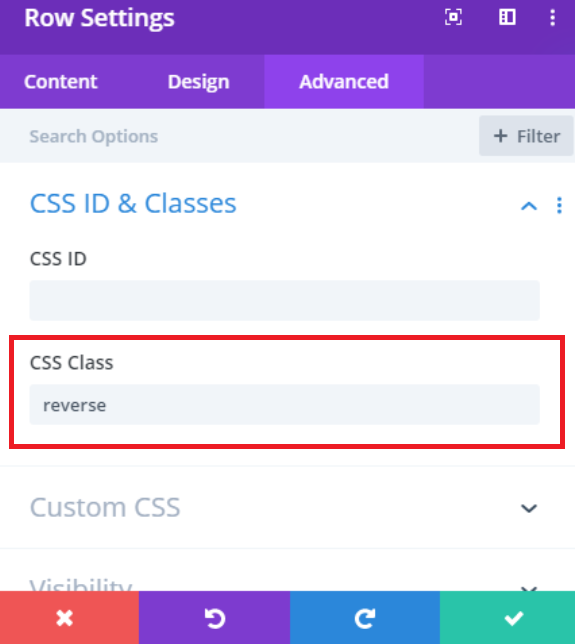
Step 3: Add custom CSS to reverse the column. In your WordPress dashboard, go to Divi → Theme Options → General.
@media screen and (max-width: 980px) {
    .reverse {
        display: flex;
        flex-direction: column-reverse;
    }
}
Step 4: Save the changes.
Publish your page to make the reverse column order visible to your mobile users.
That’s it! You’ve successfully reversed the column order on mobile devices in the Divi theme without any complicated coding. Your content will now appear in the desired order for a better mobile user experience.
Conclusion: Reverse Columns on Mobile in Divi
In conclusion, optimizing your website for mobile users is crucial in today’s digital landscape. Reversing columns on mobile devices using the Divi theme can greatly enhance user experience.
By following the simple steps outlined in this tutorial, you can ensure that your content appears in the most user-friendly order on smaller screens. This can lead to lower bounce rates, increased user engagement, and ultimately, a more successful website.
With just a few adjustments, Divi empowers you to create a responsive and user-focused design, catering to your audience’s needs.
Why should I reverse columns for mobile devices in Divi?
Will reversing columns affect the desktop view of my website?
Can I reverse columns for specific rows, or does it apply to the entire page?
Will these changes affect the performance of my website on mobile devices?
How do you reverse a column in Mobile?
flex-direction: column-reverse; property to the parent container of the columns.How to change the order of columns on mobile in Divi?
order property in CSS to specify the order of each column.How do you reverse columns in WordPress mobile?
flex-direction: column-reverse; property or adjust the order property for specific columns.How do I make two columns in Divi mobile?
How to reverse column on mobile in Divi?
order property in the CSS section to change the column order on mobile.How to reverse a column in Divi Builder?
order property to adjust the column position in mobile view.How to reverse column order in Divi?
order: -1; on the column you want to appear first on mobile.