
Are you looking for a way to add custom font in Webflow?
If you are a designer or a businessman and do not fit the routines fonts, want to change something on sites. In webflow, you can easily add custom fonts and give the traditional style to make personalized sites. If you want to use Adobe fonts or Google fonts in the site follow the integrations in the fonts tab.
Here is a simple step to add default fonts custom font in Webflow. Once to upload Google fonts in webflow, download them in a Zip file, and should be uploaded on webflow.
The Benefits of Webflow
In webflow easy to build websites with animation without using any code. It can make your website cost-effective and simple. It can make things easier in business, marketing, or freelance and gives a professional look to your websites.
Here are a few reasons why people should use the webflow for building a website.
- Responsive websites with responsive design
- It is beginner-friendly
- help for customer services
- Interactions and animations
- Personalize customization as likes to use customs CSS, fonts
Step by step Add custom font in Webflow
Here are step-by-step guides to adding custom font in webflow with 2 steps in a short time like 1 minute.
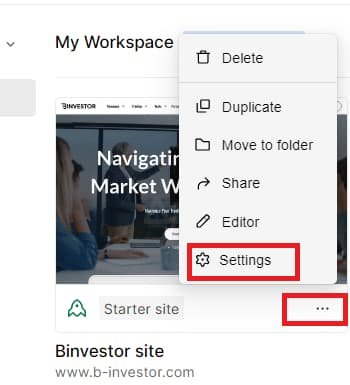
Step 1: Go to Webflow and open project setting “settings”
Step 2: Fonts tab, scroll down to Custom fonts, and upload your font file(s) there.
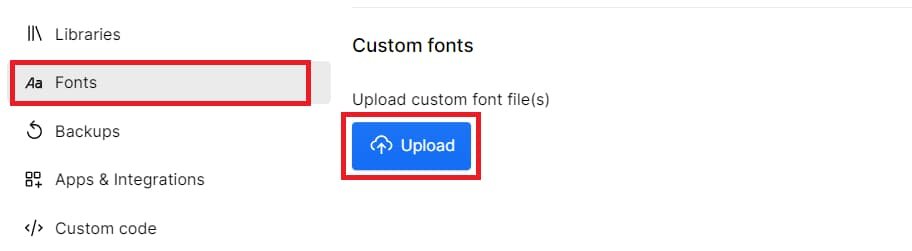
Saves changes and uses its own custom fonts on a website to give the traditional looks to webflow sites.
Conclusions
By following these steps, add custom fonts in the webflow project settings. Custom fonts hold professional to influence its overall design and appearance. You can use a variety of custom fonts on site and it can leave the last impression on investors. And do SEO on Webflow websites.