
Do you want to fix the default kit missing error in Elementor Pro/free?
Default kit missing errors occur when you install a brand new site with Elementor Core/Pro. It also occurs when the default kit is deleted from the template library.
In this post, We will show you how to Fix Default Kit Missing Error in Elementor.
Fix Default Kit Missing Error in Elementor
Follow the step-by-step guide to fix the default kit missing error in Elementor Pro/free.
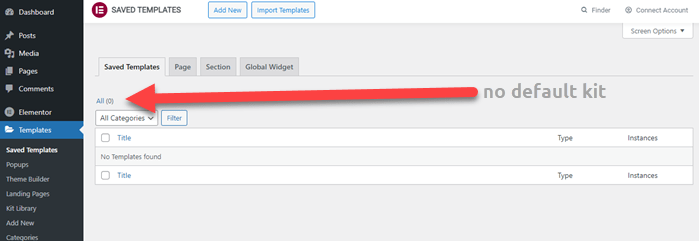
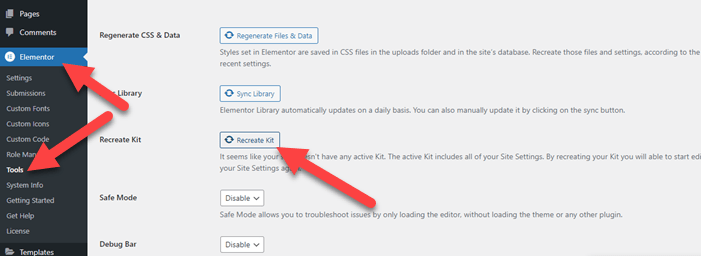
Step 1: Navigating to Elementor > Tools > General Tab.
Step 2: Here you will see an option to Recreate Kit.
Step 3: Click the Recreate Kit button and the Save Changes button
Step 4: A New Default Kit will be generated.
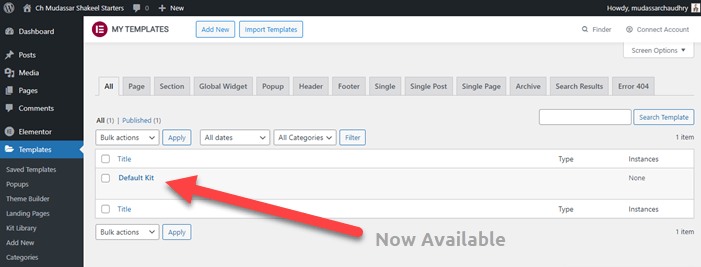
This option is only available if the default kit is missing or corrupted. By clicking “Recreate Kit,” a new default kit will be generated, and the “Recreate Kit” option will disappear from the General tab.
Successfully, you fix the default kit missing error in Elementor Pro/free.
Conclusions
If your Elementor default kit is missing it creates problems, and you cannot make the perfect websites. I hope this step-by-step guide is helpful for you.
The Complete Guide to Troubleshooting and Fixing Common Elementor Problems
If you face any problem comment below. we will help you to fix this problem.