You may create a primary menu in the main header and a secondary menu in the top header using the Divi Theme. You may notice that the menu items from both menus are shown within the same mobile menu if you access your site on a mobile device. Here’s today we will show how to Hide Secondary Menu Items in Mobile Menu.
You Might Also Like: Divi Footer for the website
Hide Secondary Menu Items in Mobile Menu Divi
We show step by step. It is easy. You just need to add below custom CSS.
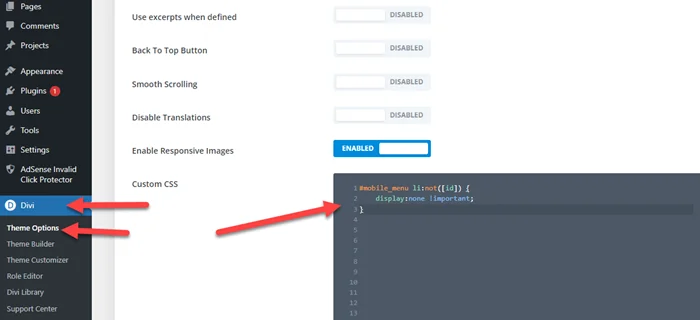
Step 1: Copy below CSS Code
#mobile_menu li:not([id]) {
	display:none !important;
}
Step 2: Go to Divi > Thene Options > Custom Css and Paste the above code.