8 Best Plumber Elementor Themes

Do you want the best Plumber Elementor themes? In this article, I am showing you the best plumber Elementor themes.

Why use a Plumber Elementor Themes?

If you need a build an Elmentor website for plumber services. Here is a collection of unique Elementor themes. It gives many demos with multiply options. Elementor is a powerful drag and drop page builder. You get control over these themes. Elementor is the famous page builder for WordPress. You can create a beautiful WordPress website using Elementor.

You Might Also Like Free Elementor Templates For WordPress.

List of Best Plumber Elementor Themes

Check out the below list of best plumber elementor themes. These are the best themes for the plumber business.

Plumco – Plumber WordPress Theme
Plumco – Plumber WordPress Theme

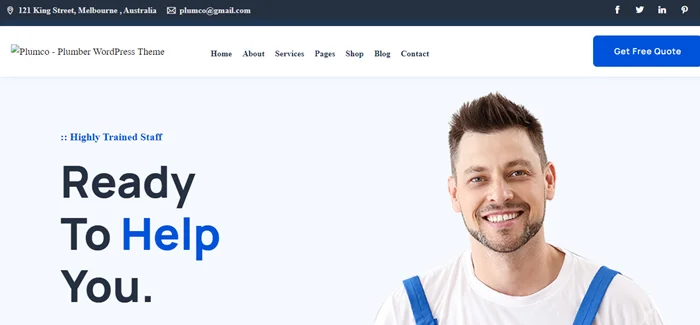
Plumco is a unique Elementor WordPress theme for plumbing services. This theme is lightweight with the option of the framework. You can build the element or page builder with custom fields and tons of features. You can change any section as you like. It is a clean and simple desktop & mobile device. You can customize every section according to your plumber services.

Here are some core features.

  • Elementor Page Builder
  • 3 Home Page
  • Easy to Customize
  • Unlimited Colors
  • Sticky Menu While Scrolling
  • Advanced Typography
  • Contact Form 7
  • Fully Responsive Layout

Airtech – Plumber HVAC and Repair theme
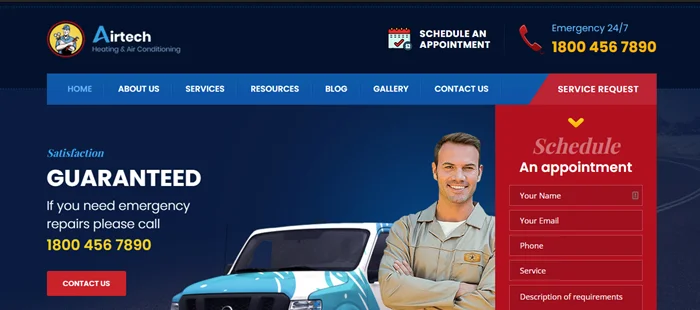
Airtech – Plumber HVAC and Repair theme

Airtech is a fast, SEO-friendly theme built for plumbing, heating, air conditioning, roofing, and other business services. Airtech theme comes with multiple demos with unique designs. This theme gives an element or page builder that is suited for an online web presence.

This theme comes with features for online businesses.

  • Fully Responsive
  • Special look & feel
  • 15+ Prebuilt pages
  • Drag Drop page builder( Elementor )
  • Highly Customizable
  • Drag & Drop page building
  • Powerful admin panel
  • SEO Friendly & Yoast compatible
  • Breadcrumb plugin compatible

Plumber Pro – WordPress Theme for Repairing Services

Plumber Pro – WordPress Theme for Repairing Services

Plumberpro is a pre-build WordPress theme for Repairing services. It is a drag and drops page builder (Elementor). It gives a customization option that allows you to change the style without using any code of any elements. The layout see nice in any size that adjusts any devices like iPad, iPhone, Android Mobile or tablet.

There are so many reasons to choose a plumber theme, here are a few features.

  • Fully Responsive (Tested on Multiple Devices)
  • Full Width Layout
  • Bootstrap Powered
  • Visual Composer Plugin
  • Slider Revolution Plugin
  • One Click demo data importer
  • Included documentation.
  • 24/7 Premium Support

Plumbio – Plumbing Services WordPress Theme
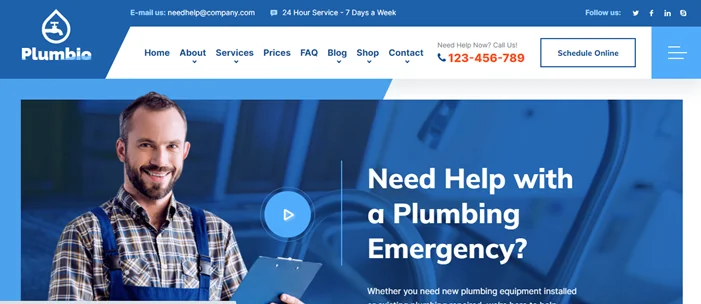
Plumbio – Plumbing Services WordPress Theme

Plumberpro is a pre-build WordPress theme for Repairing services. It is a drag and drops page builder (Elementor). It gives a customization option that allows you to change the style without using any code of any elements. The layout see nice in any size that adjusts any devices like iPad, iPhone, Android Mobile or tablet.

There are so many reasons to choose a plumber theme, here are a few features.

  • Blog page layout
  • Google fonts
  • SEO optimized
  • Bootstrap
  • Responsive & Retina
  • HTML5 & CSS3
  • Typography option

Plumbit – Plumbing WordPress Theme
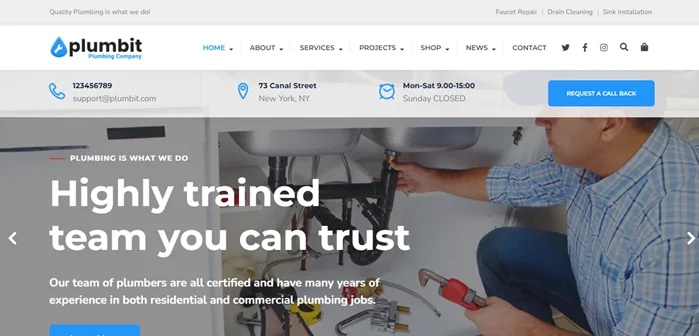
Plumbit – Plumbing WordPress Theme

Plumbit is a powerful and mobile responsive theme. It looks nice on all devices. You can easily customize in just one click any aspect of the theme. Plumbit is a modern theme that is specially designed for plumbers, air conditioning repair, heating repair, solar system, and repair services businesses.

Here are some features.

  • Responsive Layout
  • No coding skills are needed.
  • Retina Ready
  • Unlimited Color Schemes
  • WooCommerce Ready
  • Contact Form 7 Ready
  • Elementor Ready
  • Documentation included
  • One-Click Demo Import
  • Child theme included

Plumbing – Repair Elementor WordPress Theme
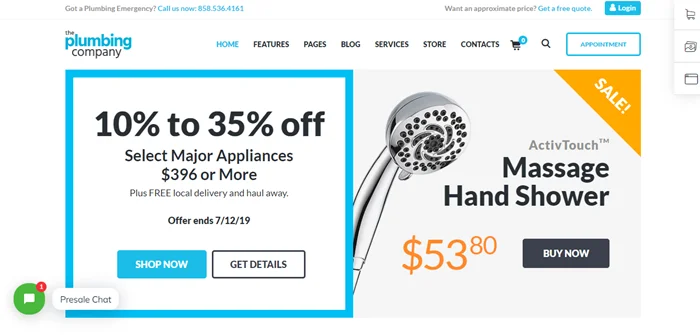
Plumbing – Repair Elementor WordPress Theme

The Plumbing theme is responsive & construction a WordPress theme.  It is designed for plumbing services and fits any business maintenance. It is easy to edit and customize. You get full control on header & footer areas on the Plumbing theme.  It supports popular plugins and user friendly.

Here are some features.

  • Professional design
  • One-Click demo installation
  • Modern, Flexible, Customizable
  • Retina Images Support
  • User menu and Main menu support
  • Interactive Ajax Search
  • Flexible Colors & Typography

Fixelo – Handyman Services WordPress Theme
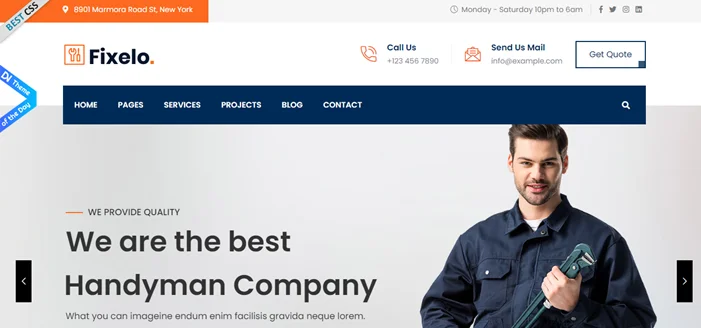
Fixelo – Handyman Services WordPress Theme

Fixelo WordPress theme is built for handymen, carpenters, plumbers, electricians, AC repair, painting, and more services. You can easily customize with typography, header, and unlimited color or footer. This theme is an element builder with creative and unique design. It gives many theme options and free Icon fonts.

Here is some feature.

  • WordPress 5.8.x compatible
  • Elementor Page Builder
  • Bootstrap Framework
  • Cross Browser Compatible
  • Modern Design and Bootstrap Framework
  • One Click Demo Import
  • Font Awesome Icons
  • Cross Browser Compatible

Fixtor – Handyman & Home Repair WordPress Theme

Fixtor – Handyman & Home Repair WordPress Theme

Fixtor is a clean and modern WordPress home repair theme. If you are a plumber or handyman and engineer Fixtor is grate option. It is an online website for your services and business. It comes with a cool feature and is professional. It gives 05+ pre-build demos with different layouts. You get the demo imported quickly in your services. in just one click.

Moreover, Fixtor theme has surprising features:

  • 05+ Handyman Homepage Demos
  • 03+ Services Listing Styles
  • Project Pages
  • “Get a Quote” Online Form
  • Mobile-First Design
  • High Loading Score
  • Many Premade Functional Pages
  • One-Click Demo Import
  • Package of WordPress Plugins
  • Built on Elementor Drag & Drop Page Builder for WordPress

We hope this article helped you find the best Plumber Elementor themes. You can use any of the themes above, you can build and customize a website that will power your brand identity, attract and convert customers.

How to Redirect 404 To Homepage

 If you want to redirect all the old posts and pages and 404 errors on a WordPress site to the home page. Today we will show how to redirect 404 to homepage.

You Might Also Like How to Submit website to Google Search Console

Redirect 404 To Homepage

To redirect all posts and pages even custom post type 404 errors to the homepage, you need to follow the below steps.

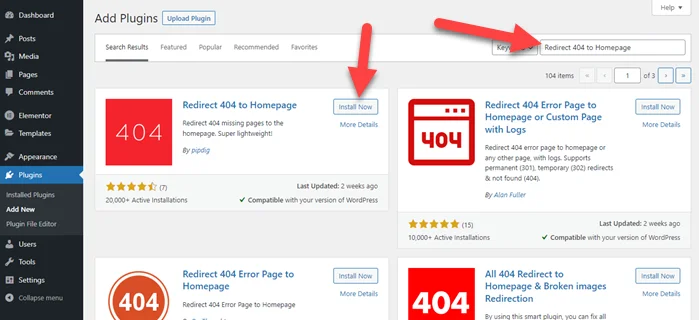
Step 1: Open the WordPress dashboard. Go to Plugins > Add New > Search Redirect 404 to Homepage >Install and Activate “Redirect 404 to Homepage” plugin

Redirect 404 To Homepage

Step 2: After plugins activation, you don’t need any configuration. It works properly.

If you are using the rank math SEO plugin then follow the below steps.

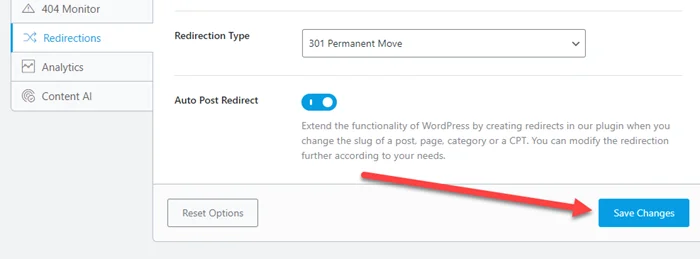
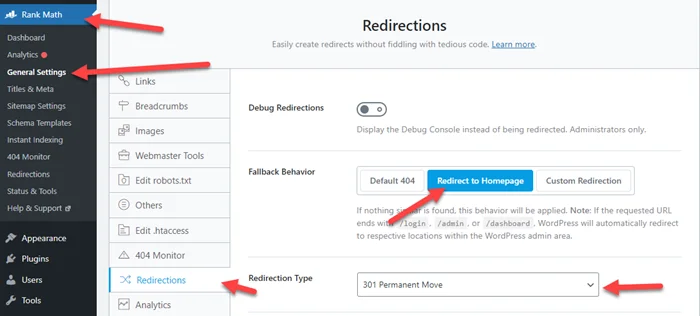
Step 1: Go to rank math > General Settings > Redirections > Click on Redirect to Homepage

Redirect 404 To Homepage plugins

Step 2: Last, Click on Save Changes

Rank Math Save Changes Setting

We hope this post helped you redirect 404 to homepage. If you still face an issue then comment below, definitely we will help you.

You Might Also Like Four Steps to Create a Robots txt File

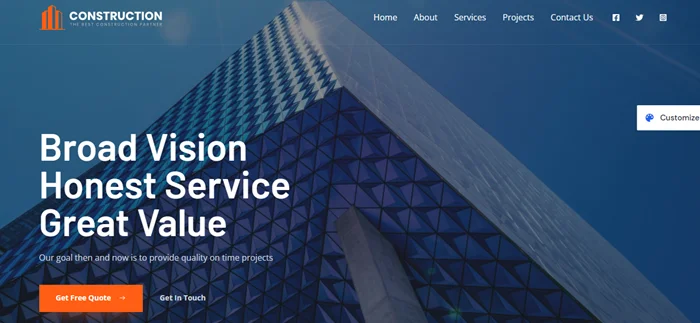
Best Construction WordPress Themes 2022

Are you looking for the Best Construction WordPress Themes? These themes customize your business websites for the next level and grow your business.

Why use WordPress Construction Themes?

The best WordPress construction themes provide unlimited homepage demos, design layouts, and create contact forms. Here I collected the best construction themes for you. It is easily customized the website localize and globalize the experience and attack more clients.

You Might Also Like Free Elementor Templates For WordPress.

Learn More About Elementor Page Builder.

Best Construction WordPress Themes

Here are the best construction companies with attractive styles and more features. This theme fast-loading and build a stunning website for your construction business.

Avada

Avada Construction WordPress Theme

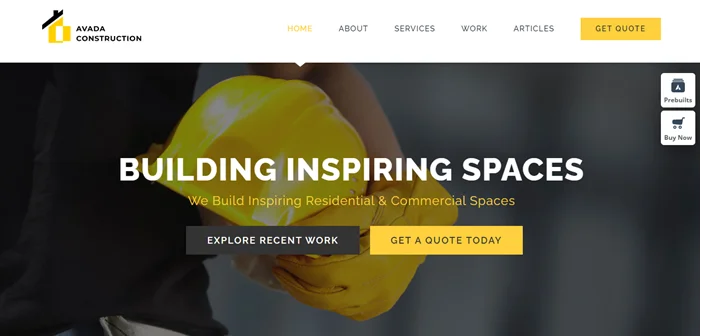
The Avada WordPress theme is one of the best-selling themes in the marketplace. It comes with a lot of options with 80 pre-built websites. It allows you to build anything that suits your brand. It is a construction website, which you can import with just one click. You get complete control of the layout section easily create any section.

Here are some core features.

  • Easy to use
  • Easily create stunning pages
  • WooCommerce short codes are compatible with Avada columns
  • Custom Page Title Bars and Footer Layouts
  • Custom Single Post Layouts and Portfolio Layouts
  • Stylish demo site
  • Multiple CTA buttons
  • Testimonial section

Yellow Business

Yellow Business - Construction Template

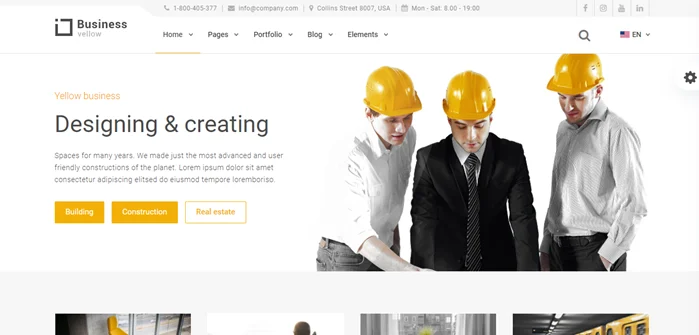
Yellow Business is the modern theme and develops the modern website. You can use it for every business because it is focused on professional design. You can drag and drop easily. Build a user-friendly site within advanced features. You get urgent support during the online documentation problem.

After installing, you get the following core feature.

  • Theme options panel
  • Easy to use
  • Unique components
  • No coding required
  • One-click demo import
  • Ready documentation
  • Post Type Engine
  • 15 portfolio design variants

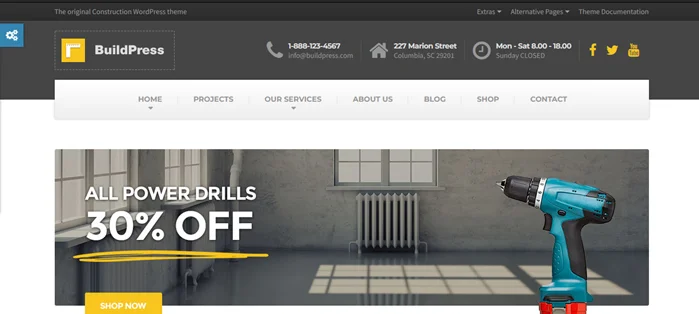
BuildPress

BuildPress - Multi-purpose Construction and Landscape WP Theme

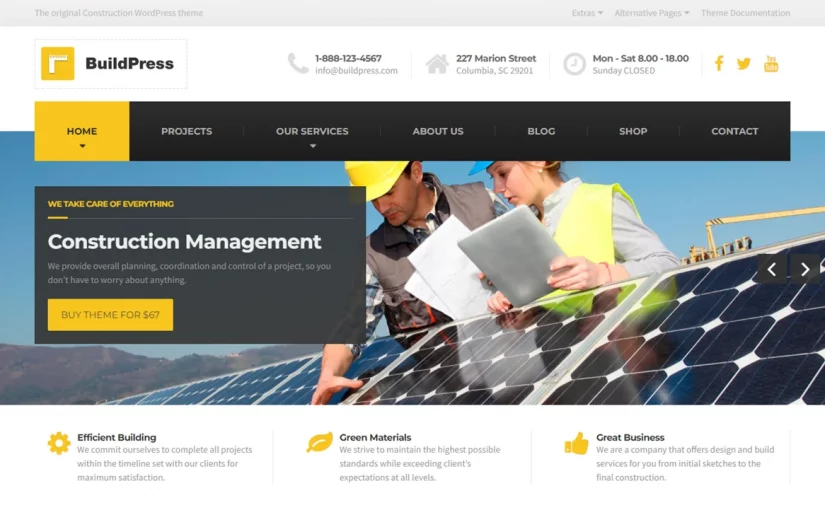
BuildPress is a top-selling and high-quality WordPress theme for construction business websites. You can build without any coding knowledge. Buildpress allows you to create smart websites.

Here are some features of Buildpress.

  • Intuitive Page Builder
  • WooCommerce compatible
  • Bootstrap 4.x Framework
  • Lifetime Updates and User Support
  • Essential Grid Gallery Plugin
  • Drag and drop builder
  • Seven homepage demos
  • Drag and drop custom widgets onto the page

Astra

Astra Construction wordpress theme

Astra is a full customizing and user-friendly theme in the construction business market. You can build in just one click easily. It offers many features that uniquely customize your website without any coding.

Here are some core features.

  • flexible layouts
  • Customize Without Code​
  • Header Footer Builder
  • Drag and Drop Builder
  • Pre-Built Websites
  • Blog & Archives
  • Customize Without Code​
  • Colors & Typography

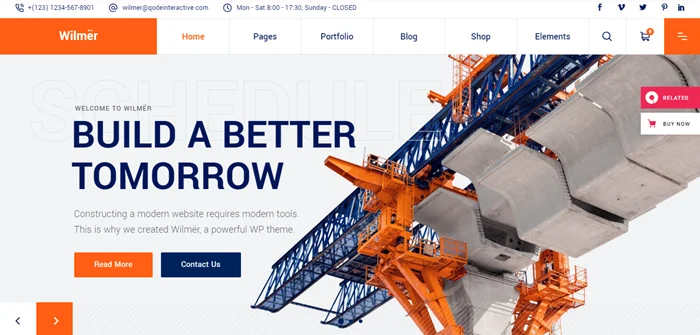
Wilmer

Wilmër - Construction Theme

Wilmer is a modern WordPress theme that gives a premium look to traditional construction website themes. This is a woo commerce theme and you can sell anything online. It is easy to build with zero coding knowledge. Everything knows that it is a mobile-friendly theme.

Here is a powerful feature that allows creating a unique construction website.

  • Responsive & Retina Ready.
  • 9 homepage examples.
  • Large collection of useful inner pages
  • Extensive Admin Interface.
  • Side Area
  • Twitter and Instagram social widgets
  • Interior design
  • Simple One-Click Import of Demo Content

We hope this article helped you find the Best Construction WordPress Themes. You can use any of the themes above, you can build and customize a website that will power your brand identity, attract and convert customers.
What is the best WordPress theme for a construction company?

Here is the best WordPress theme for a construction company.
Avada
Yellow Business
BuildPress
Astra
Wilmer

You Might Also Like: Best page builders for WordPress.

How to Install Google Analytics 4 WordPress Step By Step (Screenshots)

If you want to track and know your audiences then you must add google analytics on websites. Today, we will show how to install google analytics 4 WordPress step by step ( Screenshots).

Google Analytics is a free tool by google that help website and business owner to track website statistics.

You Might Also Like elementor templates for WordPress websites.

Install Google Analytics 4 WordPress

Before moving to step 1. I hope you already have a Gmail account. if not then create it. We use Gmail for signup with google analytics 4.

You Might Also Like How to Submit website to Google Search Console

Please follow every step to add google analytics to the WordPress website.

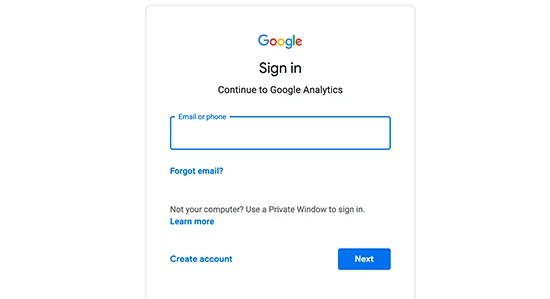
Step 1: First you need to visit Google Analytics. Now sign in with your Gmail account.

Login into Google Analytics

Step 2: After sign-in with your Gmail account and click on “Start measuring”.

Welcome to Google Analytics

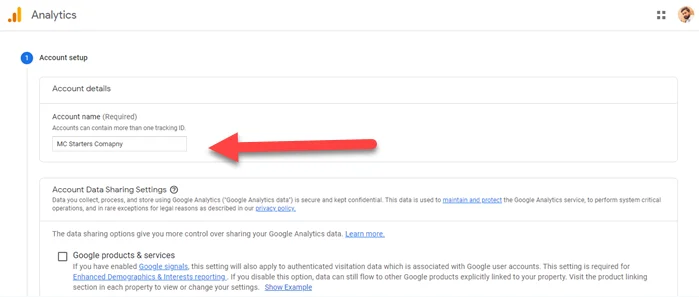
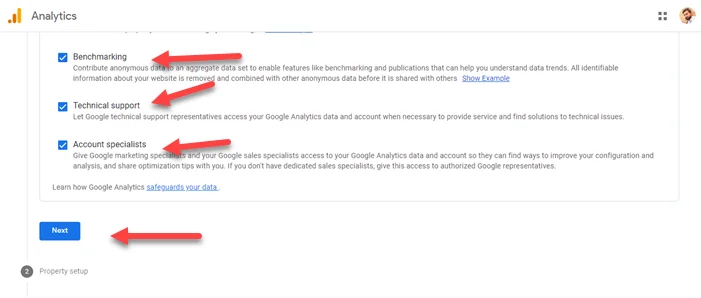
Step 3: For Account, set up enter the account name and check benchmarking, technical support, and account specialists if you want. Last on click on “Next

Google Analytics Account Name
Analytics Next Button

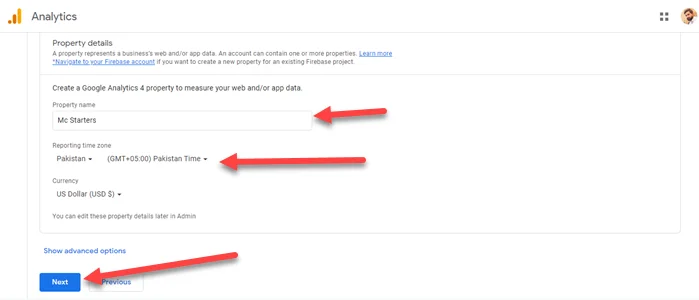
Step 4: Now enter Property details, property name, and time zone according to country. Click on Next.

Google Analytics Properities Details setup

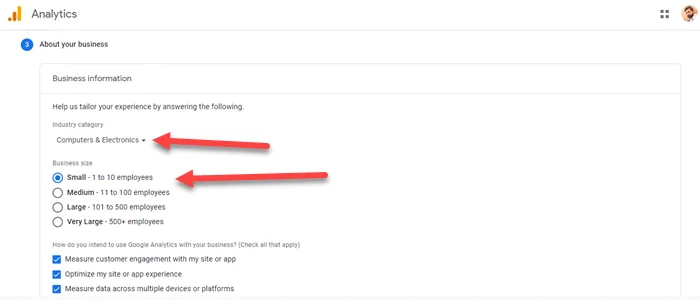
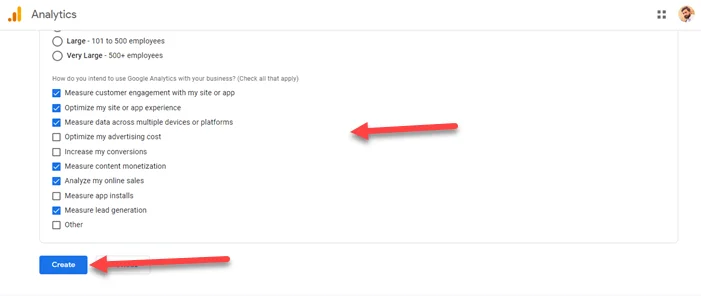
Step 5: Share your business information Such as business category, size, intent. The last click on “Create

Setup About Your Business information
Click on Create Account

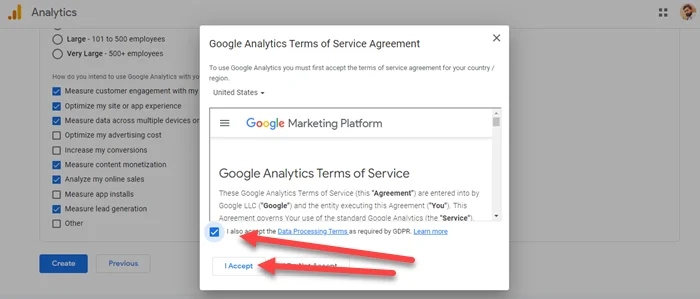
Step 6: Now check google analytics terms of service and click on “I Accept

Accept Google Analytics Terms

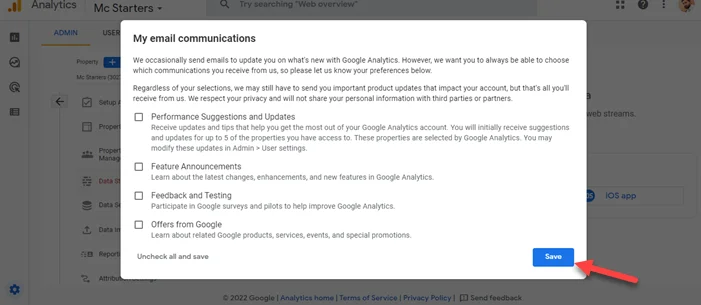
Step 7: Just click on Save.

Email Communication

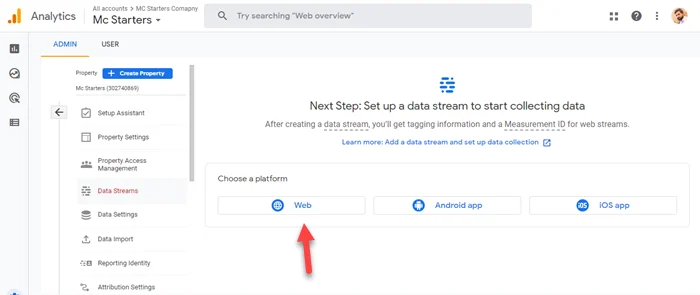
Step 8:  On the next screen, you just click on “Web” because you set up google analytics for the website.

Choose platform Web

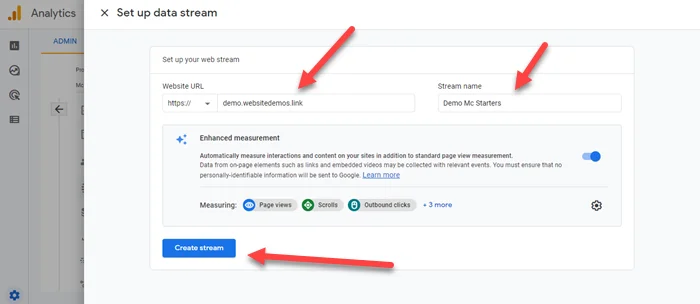
Step 9: Enter the website URL and website name. once done then on click on Create stream.

Enter Website url and Stream Name

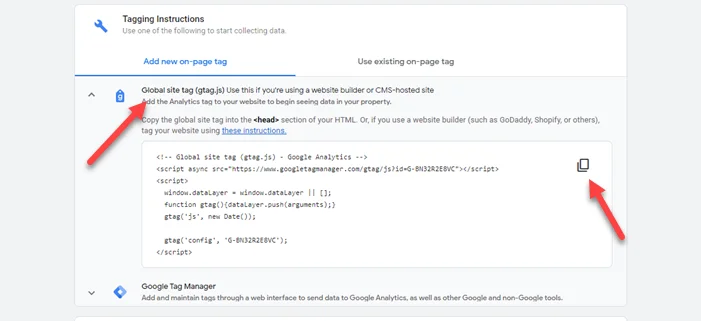
Step 10: On this screen, click on the Global site tag and copy the code.

Choose Global Site Tag

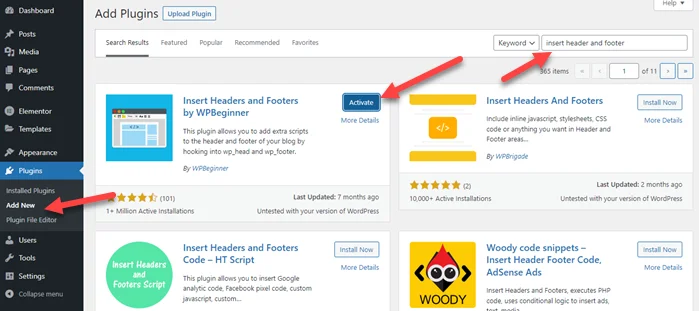
Step 11: Now Open the WordPress dashboard. Go to plugins> Add new > Search “Insert Header and Footer” > Click on Install and Activate.

install insert header and footer code plugin

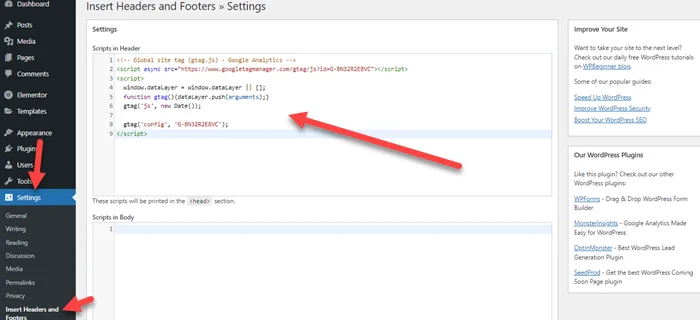
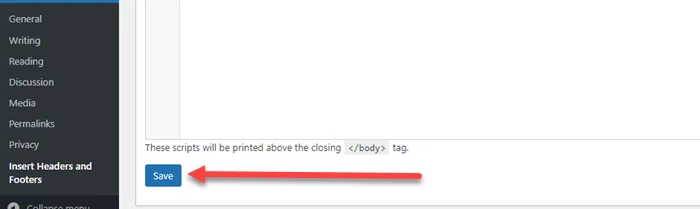
Step 12: Once the plugin installation is done then go setting > insert header and footer > paste code into header field. The last click on Save.

Paste google analytics code in header
Click on Save

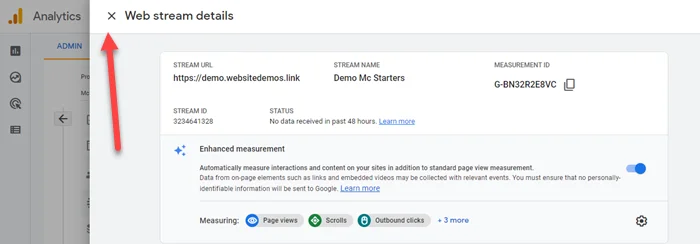
Step 13: Click on the cross to close the stream details.

Close Web Stream Details

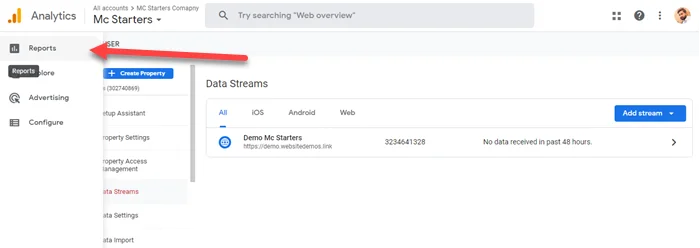
Step 14: Now click on “Reports” at the top left.

Google Analtyics 4 reports

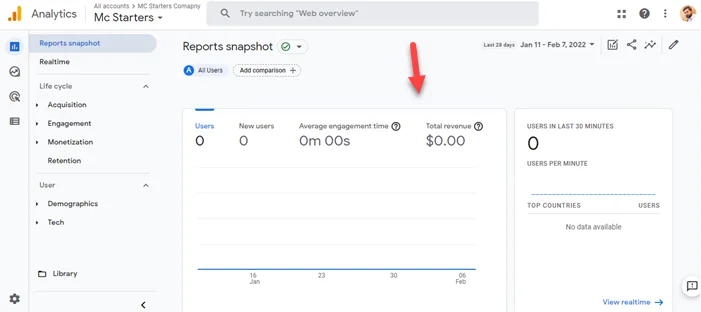
Step 15: On the next screen, click on Reports Snapshot and here you see the complete report of visiting user.

Google Analytics 4 stats

Google Analytics is a great tool with a huge amount of useful features. Some are self-explanatory and simple to use, while others take further setup.

We hope this article helped you learn how to install Google Analytics 4 WordPress. If you face any issues then comment below.

Frequently Asked Questions

How do I add Google Analytics to my WordPress website?

You can add Google Analytics to the WordPress website by installing a simple plugin.
Step 1: Install “Insert Header and Footer
Step 2: Place code into head tag.
Step 3: Click on Save Changes.

Is there a Google Analytics plugin for WordPress?

Yes, The best Google Analytics plugin for WordPress is MonsterInsights and Google Analytics Dashboard for WP.

How to Fix Googlebot cannot access CSS and JS files Error in WordPress

Are you facing Googlebot cannot access CSS and JS files warning in Google webmaster tools account for your WordPress site? This error occurs when you try to increase WordPress security. We will help you to fix this issue with the guide of two things.

  • Check Robots.txt File
  • Check WordPress Security plugin configuration

You Might Also Like to Download Free Elementor Templates

If you want to learn more about Elementor Page Builder.

Fix Googlebot cannot access CSS and JS files Error in WordPress

Check out below step-by-step guide on how to fix Googlebot cannot access CSS and JS files Error in WordPress.

Check Robots.txt File

First, you need to Check Robots.txt File. Robots.txt file controls the access of Google bot. You can check this because maybe someone by accident adds snippets that block Css and Js File.

You Might Also Like: Create a Robots txt File for Your Website

For checking the robots.txt file you need to follow the below steps.

Step 1: Install and activate “File Manager ” plugin

Install File Manager Plugin

Step 2: Click on the robots.txt file and open it.

upload-robots.txt-file-into-root-directory

Step 3: Now see some lines of code that disallowed access to some WordPress directories.

User-agent: *
Disallow: /wp-admin/
Disallow: /wp-includes/
Disallow: /wp-content/plugins/
Disallow: /wp-content/themes/

Step 4: You need to remove below three lines and save the file. Now it looks like the below snippet.

User-agent: *
Disallow: /wp-admin/

Note: If your robots.txt file is already clean and fine then check the below instructions.

Disable Security Plugin

Now you need to disable the security plugin and check configuration again maybe the security plugin block Googlebot to access CSS and Js files. These are top security plugins.

  • Sucuri Security – Auditing, Malware Scanner and Security Hardening.
  • iThemes Security.
  • Wordfence Security.
  • WP fail2ban.
  • All In One WP Security & Firewall.
  • Jetpack.
  • SecuPress.
  • BulletProof Security.

If you are using Cloudflare then also check its Cloudflare rules.

We hope you fix this issue but if still you face problems then comment below, definitely we will help you.

How To Make and Upload Divi Child Theme

Divi child theme allows you to add complex customizations to your theme without having to worry about them being lost when you update the Divi theme. In reality, there are numerous advantages to using a Divi Child theme. It makes it easy to collaborate with others by allowing you to better organize all of your unique CSS/Code in one location.

You Might Also Like Divi header layouts for Divi websites.

Download Divi Child Theme

There are multiple steps to make a Divi child theme but we already created Divi a child theme for you. Just click the link below and download it.

Download Divi Child Theme.

Upload Child Theme

After download now follows the below steps to install and activate the theme.

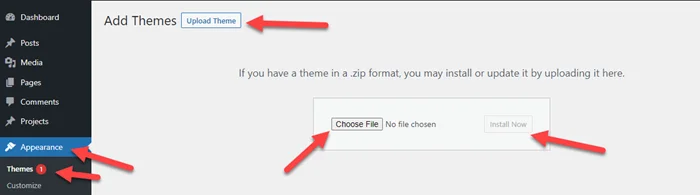
Step 1: Go to Appearance > Add New > Upload Theme > Click on Choose File > Select Download File > Click on Install Now.

Install Divi Child Theme

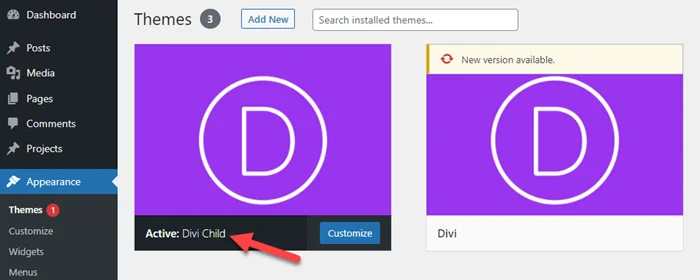
Step 2: Click on Activate.

Activate Divi Child Theme

Final Thoughts

I’m sure there are hundreds of new effective ways to make a child’s theme. However, because many WordPress themes are set up differently, I decided it would be best to focus on designing a child theme exclusively for the Divi Theme. For optimal speed, developers should be aware of best practices for enqueuing the parent and child stylesheets.

For newcomers, you don’t need to understand how everything works to use this guide or a plugin to create a child theme, and that’s fine. You may also discover that a child theme isn’t required because Divi’s built-in style options suffice. Regardless, I hope you find this article useful.

I look forward to hearing from you in the comments.

Get Professional Websites