
If you want to redirect all the old posts and pages and 404 errors on a WordPress site to the home page. Today we will show how to redirect 404 to homepage.
You Might Also Like How to Submit website to Google Search Console
Redirect 404 To Homepage
To redirect all posts and pages even custom post type 404 errors to the homepage, you need to follow the below steps.
Step 1: Open the WordPress dashboard. Go to Plugins > Add New > Search Redirect 404 to Homepage >Install and Activate “Redirect 404 to Homepage” plugin
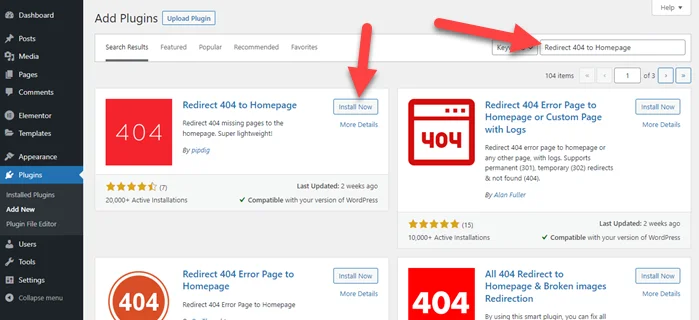
Step 2: After plugins activation, you don’t need any configuration. It works properly.
If you are using the rank math SEO plugin then follow the below steps.
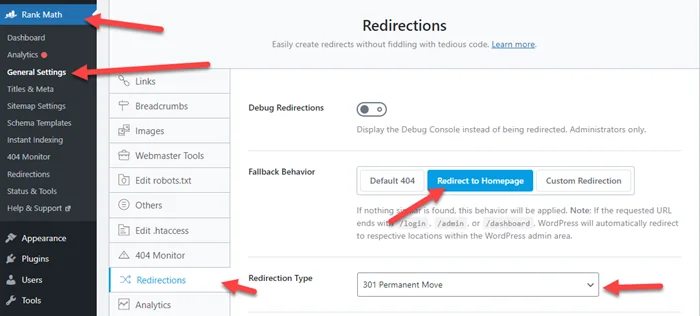
Step 1: Go to rank math > General Settings > Redirections > Click on Redirect to Homepage
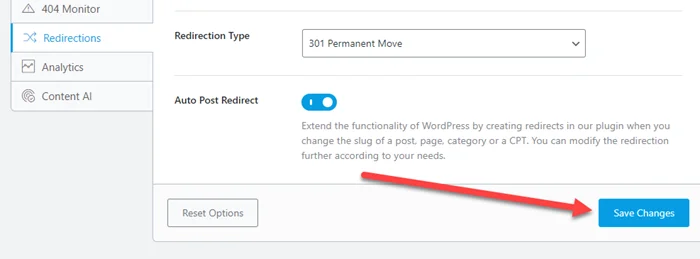
Step 2: Last, Click on Save Changes
We hope this post helped you redirect 404 to homepage. If you still face an issue then comment below, definitely we will help you.
You Might Also Like Four Steps to Create a Robots txt File