
The jumping header in Divi is a well-known issue. It happen when divi website page load.
In this post, We will show you how to fix Divi Jumping header in WordPress. I do with the help of custom CSS.
You Might Also Like to hire: Divi Website Designer for websites
Fix Divi Jumping Header
To fix divi jumping header you need to add below css code into Divi > Theme Options > Custom Css
#page-container {
padding-top: 100px !important;
}

#main-header {
top:39px !important;
}
Note: This is Code may not work. You Can adjust padding according to website header and check website without login.
You Might Also Like: Divi Header Layouts
My Header and Setting

Below is my website header “Menu Height“. You can adjust it also according to website.
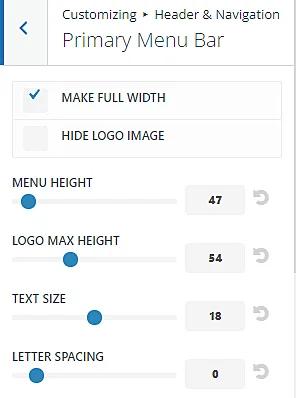
I hope you fix this issue but If you have any questions please let me know in the comments.
How to create custom header in Divi
You can create custom header in Divi using Divi theme builder. you can free header layout from our mcstarters.com websites. We create these header with responsive design. These are free to download and use.