
FlyingPress generally beats WP Rocket on raw speed and Core Web Vitals thanks to more granular image, font, and script controls, while WP Rocket wins on ease of use and beginner-friendliness. In our test, FlyingPress loaded in 0.85s with a 98 mobile PageSpeed score versus WP Rocket’s 1.15s and 91.
Is your WordPress site still slow after optimizing images and switching themes? It’s probably your caching plugin. In 2026, FlyingPress and WP Rocket remain the two most talked-about options — here’s a full breakdown of speed, features, and pricing to help you pick.
Quick Comparison: FlyingPress vs WP Rocket
| FlyingPress | WP Rocket | |
|---|---|---|
| Best for | Advanced users chasing max speed | Beginners wanting plug-and-play |
| Test load time | 0.85s | 1.15s |
| Mobile PageSpeed score | 98 | 91 |
| Image optimization | Built-in (WebP/AVIF) | Requires add-on |
| Database optimization | Built-in | Built-in |
| CDN integration | Built-in (Bunny, KeyCDN, Cloudflare) | Requires third-party CDN |
| Starting price | $60/year, 1 site | $59/year, 1 site |
| Free version | No | No |
Want Your Site This Fast Without the Trial and Error?
Picking the plugin is the easy part — configuring it without breaking your layout is where most site owners get stuck. We set up and tune caching plugins for WordPress sites every week.
What Is WP Rocket?

WP Rocket is one of the oldest and most popular caching plugins, known for working well the moment you activate it. It applies a strong default configuration automatically, so you don’t need to touch a single setting to see a speed improvement, and it’s compatible with virtually every major theme, plugin, and host — including WooCommerce and managed hosts like Kinsta and WP Engine.
What makes WP Rocket great:
- Instant setup with no complex options
- Cache preload and lazy load included by default
- Optimizes CSS, JS, and font delivery
- Integrates with most CDN providers
- Beginner-friendly interface with almost no learning curve
What Is FlyingPress?
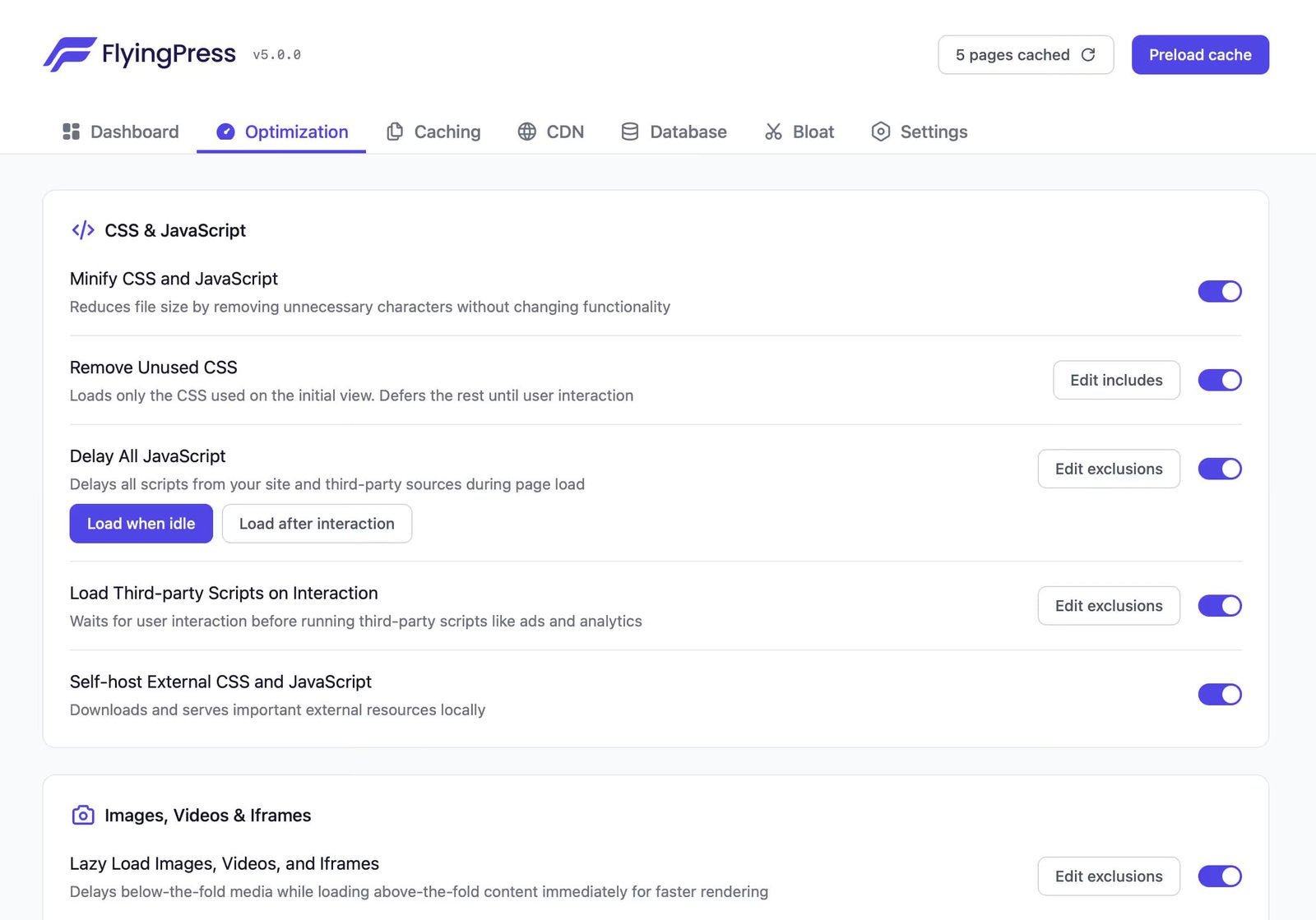
FlyingPress is a newer plugin built by performance specialists, and it shows in the level of control it gives you. It’s not harder to use than WP Rocket, but it exposes more detailed settings — WebP/AVIF delivery, self-hosted fonts, and precise script-delay rules — for users who want to push performance further than a default configuration allows.
Why users choose FlyingPress:
- Built-in lazy load and font-display control
- Self-hosted fonts with Google Fonts fallback
- Image optimization with WebP and AVIF out of the box
- Fine-grained JavaScript delay controls
- Unused CSS removal and database optimization included
If you want the deeper dive on FlyingPress specifically, see our full FlyingPress review and a real-world 3x speed test.
Speed Test Results & Core Web Vitals
We installed both plugins on the same test site — WordPress with the Astra theme, dummy content, no CDN — and compared results directly.
FlyingPress: homepage loaded in 0.85 seconds, with a Google PageSpeed mobile score of 98. LCP and CLS were both noticeably cleaner than the WP Rocket test.
WP Rocket: homepage loaded in 1.15 seconds on default settings, with a mobile score of 91.
Both passed Core Web Vitals thresholds, but FlyingPress delivered the faster, cleaner result in this test. If website speed is part of a broader SEO push, pair whichever plugin you choose with our guide on improving site speed for better SEO rankings.
Features Breakdown
WP Rocket Features
- Page caching — generates static HTML for faster page delivery.
- Cache preloading — rebuilds cache automatically after changes.
- Lazy load — delays images and video until the user scrolls.
- Database optimization — cleans revisions, spam comments, and overhead from the dashboard.
- Delay JavaScript execution — defers non-critical scripts.
- GZIP compression — reduces file size before delivery.
FlyingPress Features
- Full page caching with smart cache invalidation.
- Font optimization — preloads and self-hosts fonts, with Google Fonts fallback.
- Image optimization — WebP/AVIF compression, lazy load, responsive sizing.
- JavaScript delay & execution control — precision delay per script to avoid layout shift.
- Remove unused CSS — trims file size significantly on content-heavy pages.
- Built-in CDN support — BunnyCDN, Cloudflare, and others without extra plugins.
Not Sure Which Plugin Fits Your Setup?
The “best” caching plugin depends on your host, theme, and how hands-on you want to be. We can review your stack and tell you which one actually makes sense — no upsell.
Database Optimization & CDN Integration
Both plugins include database cleanup tools, but FlyingPress bundles it more tightly with its overall optimization flow. For CDN, WP Rocket relies on your existing third-party CDN integration, while FlyingPress connects directly to BunnyCDN, KeyCDN, or Cloudflare with a few clicks — useful if you haven’t already set up a CDN separately.
Pricing Comparison (2026)
FlyingPress:
- Personal: $60/year, 1 site
- Developer: $150/year, 5 sites
- Agency: $250/year, 50 sites
WP Rocket:
- Single: $59/year, 1 site
- Plus: $119/year, 3 sites
- Infinite: $299/year, unlimited sites
For a single site, pricing is nearly identical. WP Rocket scales more cheaply for agencies managing many sites; FlyingPress includes more by default (like image optimization) without needing add-ons.
Ease of Use
WP Rocket is the easier plugin for beginners — install it, and most of the benefit is already applied with one-click toggles. FlyingPress is still approachable, but it exposes more granular settings, which advanced users will prefer and beginners may find takes a bit longer to fully configure.
Note: never run FlyingPress and WP Rocket together — using two caching plugins simultaneously causes conflicts. Pick one.
FlyingPress vs WP Rocket: Which Should You Choose?
Choose FlyingPress if:
- You want the best available speed scores and Core Web Vitals results
- You prefer granular control over image, font, and script delivery
- You’re comfortable spending a little more setup time for a faster result
Choose WP Rocket if:
- You want a plug-and-play solution with minimal setup
- You manage multiple client sites and want the cheapest scaling option
- You prefer the most widely supported, broadly compatible plugin
If you’re also evaluating a third option, see how both stack up against Nitropack in our three-way comparison, or check our broader guide to WordPress speed optimization plugins if neither fits.
Frequently Asked Questions
Is FlyingPress better than WP Rocket?
For raw performance and Core Web Vitals, yes — FlyingPress consistently tests faster with more granular optimization controls. WP Rocket wins on ease of use and beginner-friendliness.
What is the best WordPress caching plugin in 2026?
FlyingPress is the strongest choice for site owners chasing maximum speed and Core Web Vitals scores. WP Rocket is the best choice if you want a reliable, plug-and-play setup with minimal configuration.
Can I use both WP Rocket and FlyingPress together?
No. Running two caching plugins at once causes conflicts. Choose one for caching and optimization.
Which plugin is better for Core Web Vitals?
FlyingPress generally performs better on LCP, CLS, and Total Blocking Time, based on our side-by-side test results.
Is FlyingPress beginner-friendly?
Yes. It offers more granular control than WP Rocket, but the interface is still clean, with tooltips explaining each setting — it just takes slightly longer to fully configure than WP Rocket’s near-zero-setup approach.
Conclusion
Both FlyingPress and WP Rocket are strong, actively maintained caching plugins, and either will meaningfully speed up a slow WordPress site. If performance is your top priority, FlyingPress is the winner in 2026 based on our test results. If you want the fastest path to “good enough” with the least setup time, WP Rocket remains the safer default.
Ready for a Faster Site Without the Guesswork?
Whether it’s FlyingPress, WP Rocket, or fixing what’s actually slowing your site down beyond caching, Mc Starters can audit and optimize your WordPress setup end to end.