
Divi Theme users always see Divi header shadow. Sometimes look nice but sometimes the user does not want a shadow in the Divi header. So, today we will show you how to remove Divi Header Shadow.
You Might Also Like: Free Divi Header Layout
Remove Divi Header Shadow
We create a snippet for this. You just need to copy a snippet and add it to the website. Make sure you follow all steps.
Step 1: Copy below CSS Code
#main-header {
    -webkit-box-shadow: 0 1px 0 rgba(0,0,0,.0) !important;
    -moz-box-shadow: 0 1px 0 rgba(0,0,0,.0) !important;
    box-shadow: 0 1px 0 rgba(0,0,0,.0) !important;
}

#main-header.et-fixed-header {
    -webkit-box-shadow: 0 1px 0 rgba(0,0,0,.0) !important;
    -moz-box-shadow: 0 1px 0 rgba(0,0,0,.0) !important;
    box-shadow: 0 1px 0 rgba(0,0,0,.0) !important;
}
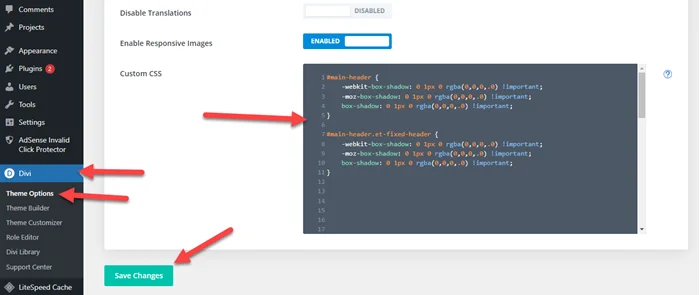
Step 2: Go to Divi > Theme Options > Custom CSS > Paste It > Click on Save Changes
I hope you fix this issue with the above step but if you still need help then comment below or check out our Divi services from the below link.
You Might Also Like to Hire: Divi Theme Expert